In this previous post we showed how to scale out Lenses SQL processors with Kafka Connect. Connect is one on three execution modes for Lenses SQL processors via Lenses, we also have in process, mainly for developers and Kubernetes, the subject of this post.
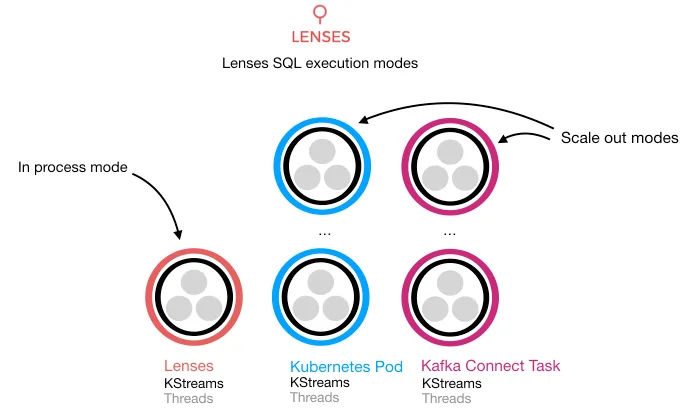
Kubernetes
Kubernetes is quickly becoming the default container orchestration, originally developed at Google it provides a rock-solid platform for streaming application and micro services in general. We have been working with Kubernetes successfully with several clients, and now Lenses v1.1 is a the first “Kubernetes native” streaming application platform! I’ve also talked here about how we have used Helm, a Kubernetes package manager to create repeatable deployments for Kafka Connect.
Containers allow developers to quickly compose applications and make them portable, Kubernetes manages these containers making sure your desired state is achieved. For example, we can use the deployment resource and set the replicas (our desired state) to be 3, i.e. we want three instances running. Kubernetes will handle this for us.
Configuration is code
That’s great but for Kafka I still need to write my java application, compile, test and build my Docker. Using Lenses and Kubernetes in combination we can deploy and manage SQL processors on the data flowing through Kafka with ease. If we see a consumer group struggling we can scale up, Kubernetes will handle the deployment for us and Kafka’s consumer group semantics will rebalance the load on the consumer for us. Magic.
Lenses SQL Processors and Connectors are config, driven by SQL.
Data pipelines with NO coding.
At Lenses.io we are excited by Kubernetes and the potential it offers to make deployment and management of streaming technologies easier. Its our motto, make streaming easy.
Checkout the video below for a demo of deploying processors from outside of Lenses and creating and scaling from within. Naturally Lenses has APIs backing the frontend so this can all be done via a continuous integration and deployment pipeline.
If you are paying attention to the
To play this video, accept functional cookies in your privacy settings.
YouTube video
Additional Resources
Find out more about Lenses & Lenses SQL Processors: Lenses Documentation
Download Lenses Now at Downloads Page
Relevant Blogs