

Kafka replication built for resilience, not lock-in
Lenses K2K, secure data replication between any cloud or platform.





Kafka is only as resilient as your replication strategy
A single Kafka cluster is a single point of failure. An outage, ransomware attack, or failed upgrade can bring every dependent application down. Replication keeps a second cluster ready for failover — but data alone isn’t enough. Without consumer offsets, schemas, and observability, recovery means reprocessing, gaps, and manual fixes.
The same approach that protects against disaster also enables zero-downtime migrations, cross-team data sharing, and running Kafka across clouds without vendor lock-in.
The same approach that protects against disaster also enables zero-downtime migrations, cross-team data sharing, and running Kafka across clouds without vendor lock-in.
Regulation demands proof over promises
DORA, SOC2, and sector-specific frameworks have raised the bar. Your Kafka replication strategy needs to be documented, and verifiable.
Single vendor lock-in is a liability
True resilience means replicating and failing across providers. Stay in control with the freedom to run Kafka where it makes sense.
The threat landscape has expanded
Cyber incidents and geopolitical disruptions put regions and providers at risk. Limited Kafka replication leaves you at risk of failures you can’t control.
Real-time operations can’t tolerate data loss
When handling critical real-time workloads, seconds of data loss mean revenue impact, compliance breaches, or broken customer experiences.
What is Lenses K2K?
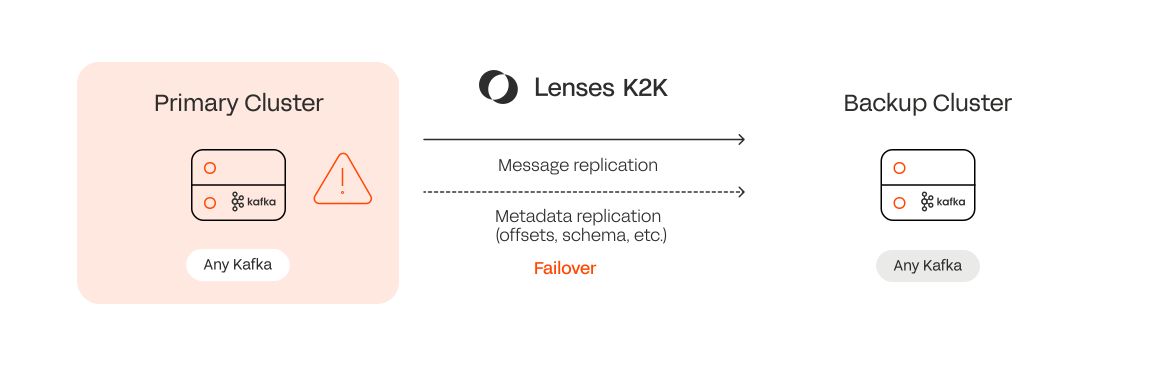
Lenses K2K (Kafka to Kafka) is a vendor-agnostic replication tool that connects any two Kafka clusters. It continuously copies messages and metadata — partitions, schemas, topic configurations and consumer group offsets, so consumers can resume exactly where they left off after a failover or migration.
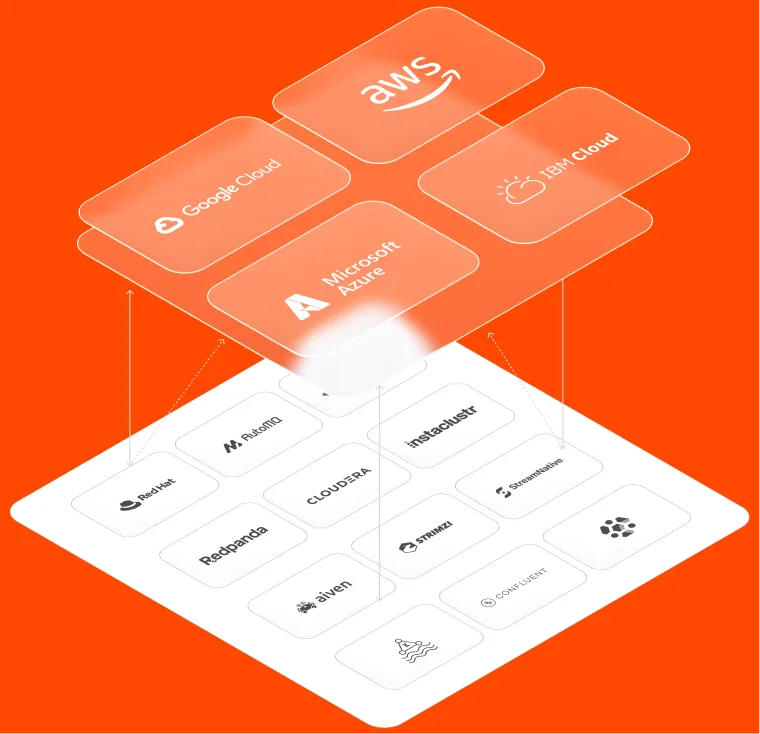
K2K runs as a lightweight, cloud-native application, with no Kafka Connect or broker-level dependencies – across Amazon MSK, Aiven, Confluent, Redpanda and Apache Kafka.
Universal, user-friendly, Kafka replication
Vendor agnostic
Replicate streaming data across any Kafka environment, vendor, or cloud. Lenses works with any Kafka flavour and handles schema translation automatically — including formats like Avro and Protobuf.
What enterprises use Lenses K2K for
Disaster recovery
Your backup cluster only matters if your consumers know where to resume.
Most Kafka DR setups handle data replication only. Few handle what consumers need at failover: the right offset, on the right cluster, without someone manually intervening at 3am.
K2K continuously maps offsets between source and target, so when infrastructure fails, consumers resume exactly where they left off. No reprocessing. No gaps. No topic renaming, no application reconfiguration.
K2K helps you:
- Replicate critical Kafka topics to standby clusters continuously
- Fail over consumer groups without data loss or duplication
- Avoid topic renaming and the application reconfiguration that comes with it
- Support multi-region recovery without vendor lock-in
- Reduce the gap between your DR plan and what really happens during an outage.
Migration Between Vendors or Clusters
Moving between cloud providers, Kafka vendors, or cluster versions is high-risk precisely because you can't afford to get the cutover wrong.
K2K & Lenses DevX give you a dedicated five-step migration workflow: replicate, validate, cut over, and roll back if you need to - with live side-by-side offset tracking so you know exactly where both clusters stand before you commit. What used to take months, becomes something engineers can run fast and, if needed, reverse.
K2K helps you:
- Migrate between Kafka vendors, platforms, or clusters versions.
- Validate data and consumers in real time before cutover
- Roll back offsets cleanly if something needs to return to the source environment
- Cut migration timelines from months to days
- Support hybrid, cloud, and multi-cloud infrastructure strategies.
Data Sharing
As organizations scale across clouds, vendors, and business units, getting streaming data to the people who need it becomes a problem. You have to reach analytics teams, partners, downstream services without exposing sensitive data or creating platform bottlenecks.
K2K replicates selected topics to dedicated clusters with built-in masking and filtering, so data sharing doesn't mean compliance risk. Engineers can deploy their own replication pipelines through secure Kafka Connections, following the governance rules.
K2K helps you:
- Share event streams across teams, regions, or business units
- Provide isolated clusters for consumers, partners, or analytics platforms
- Mask and filter sensitive data before it leaves the production environment
- Enable self-service replication without creating platform team bottlenecks
- Feed AI, analytics, and operational use cases with fresh, real-time data.
- Replicate data to lower environments for testing, for example prod to staging.




Lenses gave us the confidence to migrate to Confluent Cloud, and the migration overall has improved our engineering productivity by 20-30%.
See the Kafka replicator in action
Why Lenses K2K is different
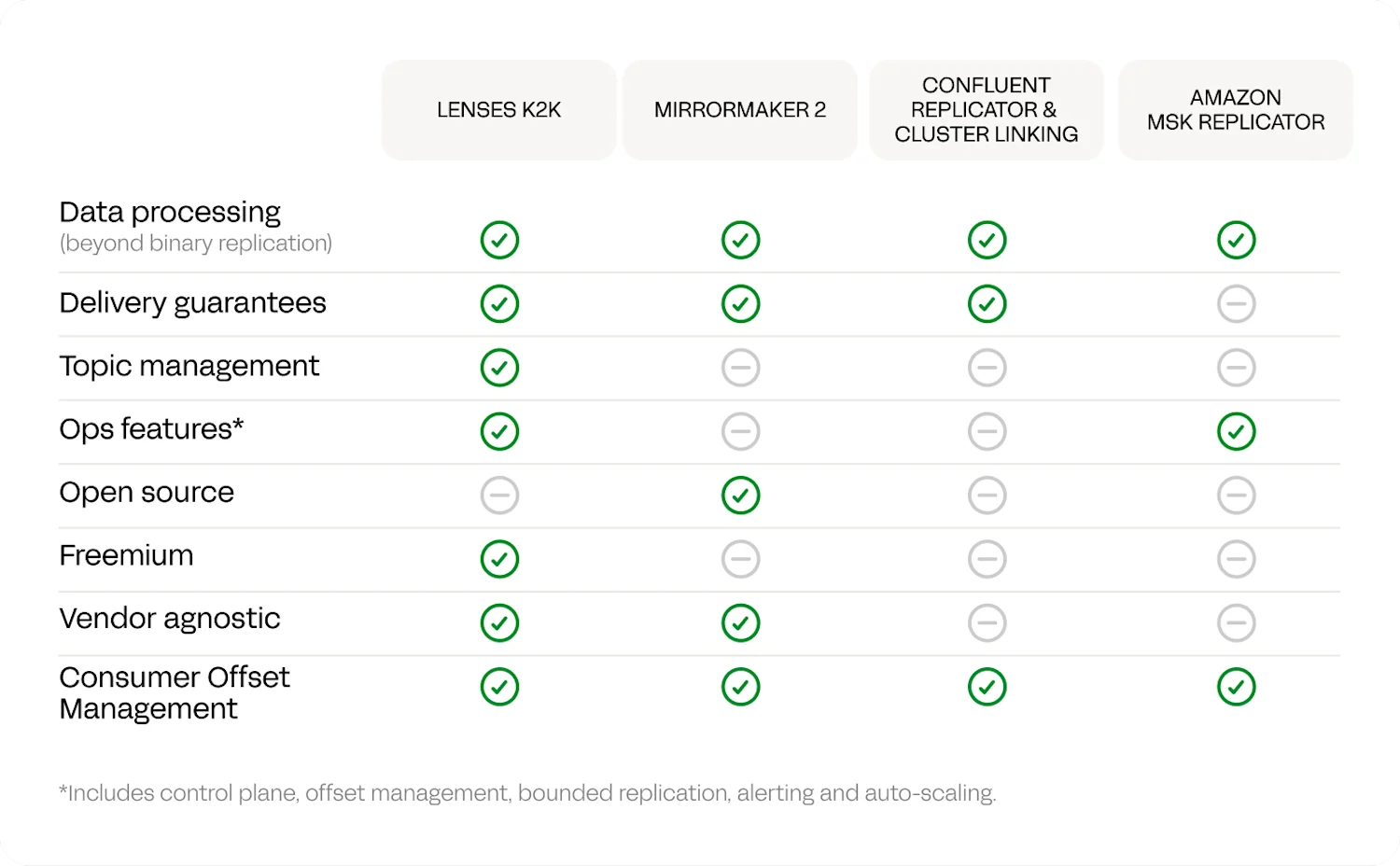
MirrorMaker2 is free and widely used. Native solutions like Confluent Replicator are polished and well-supported – but only within Confluent. Both have a problem: neither handles offset translation seamlessly in the DR configurations most teams run, and MM2 runs on Kafka Connect, creating additional complexity that means the workarounds are often harder than the problem they're solving.
- Lenses K2K Replicator: Advanced data manipulation, Kubernetes-native, platform-neutral.
- Apache MirrorMaker2 (MM2): Complex to configure & operate.
- Confluent Replicator: Part of Confluent ecosystem, but inherits MM2 complexity.
- Confluent Cluster Linking: Only works in Confluent Cloud.
- AWS MSK Replicator: Fully managed SaaS, vendor-specific (MSK only), no exactly-once or transformation & replication limited to single AWS account.
Watch our latest Kafka replication webinar
To play this video, accept functional cookies in your privacy settings.
Vimeo video

Kafka disaster recovery works by continuously replicating your data to a standby (DR) cluster you can fail over to if the primary goes down. The part most setups miss is replicating metadata alongside the messages — schemas, topic configurations and consumer offsets — so applications resume exactly where they left off instead of reprocessing. Lenses K2K does this across any Kafka, syncing consumer offsets continuously to achieve recovery times often measured in minutes, with no topic renaming and no vendor lock-in.
No. Unlike MirrorMaker2. Lenses is Kubernetes-native, meaning no additional technical debt from running Kafka Connect clusters. This also improves performance and Total Cost of Ownership.
You can replicate topics with a maximum of five partitions, and no exactly-once replication.
Companies replicate Kafka clusters for several reasons: disaster recovery and business continuity, data sharing between teams or external partners, vendor migration to avoid lock-in, workload migration between environments (on-prem to cloud), and data subsetting for testing with production-like data.
Read more >Kafka replication typically works by consuming messages from source topics and producing them to destination topics, often with additional features like schema registry synchronization, consumer offset translation, and topic configuration replication.
Read more >MirrorMaker 2 (MM2) is the open-source standard but requires complex Kafka Connect setup and lacks modern features. Commercial alternatives like Confluent Replicator offer support but inherit MM2's complexity. Cloud-native solutions like AWS MSK Replicator are easier but vendor-specific.
Read more >For K2K, yes. But not all other solutions do. While some tools like MirrorMaker 2 and Confluent Cluster Linking support exactly-once semantics, others like Confluent Replicator and AWS MSK Replicator do not, potentially leading to duplicate messages.
Read more >Lenses K2K automatically handles schema registry synchronization between clusters, including different schema registry types. It manages schema evolution and compatibility checks, supporting Avro, Protobuf, and JSON schemas.
Read more >Lenses K2K is a java-based application designed to run on Kubernetes, ideally close to the target Kafka cluster that you are replicating to.
The Lenses Developer Experience will help you identify the correct Kubernetes cluster to deploy to, and do all the deployment.
Read more >There is a free version that's restricted and accessible to download. A restricted version will also be included in Lenses Community Edition. For all enterprise features, you need to be a subscribed Lenses customer. Contact our teams for more information on pricing.
Request quote >K2K is available as a standalone container. But you will be responsible for the deployment, governance, and monitoring. We recommend the simplicity and power of managing K2K through the Lenses Developer Experience, found in Lenses 6.