“If the security is not right, we can’t adopt the new stack”.
“Our compliance team won’t allow anything without an audit trail”.
The need to take security seriously should not be breaking news.
Organisations create modern data platforms with small teams to manage them. But a successful project may have many, dozens even hundreds of different clients: internal engineering/product teams, analytics even 3rd party partners.
To scale, a self-service, orchestration and governance portal is required. This, however, exposes security risks. And here’s the challenge.
At Lenses.io security has always been a first-class citizen. Check out our security usecase here.
We introduced a number of new features in Lenses 3.0 to strengthen Kafka’s security posture, to give you confidence to open your platform to your business via secure self-service, governance and observability whilst meeting the highest security, data privacy and compliance requirements. Here are a few highlight features.
Namespaces
Our new data Namespace model improves the prior black/whitelisting RBAC while providing a more granular level of creating access controls. The namespaces work with any Kafka setup and apply to all Lenses channels (UI/CLI/API & SQL).
Namespaces are defined as a set of Kafka Topic names or wildcard expressions.
Namespaces belong to user groups (which can be mapped to an LDAP group for example) and introduce permissions based on the following dimensions:
- Data layer (ie. what topics can be viewed/edited/created/deleted and can the data in that topic be viewed).
- Application layer (Can applications such as connectors, SQL processors, consumers etc be viewed or managed)
By doing so we will be able to host different projects & teams.
Example:
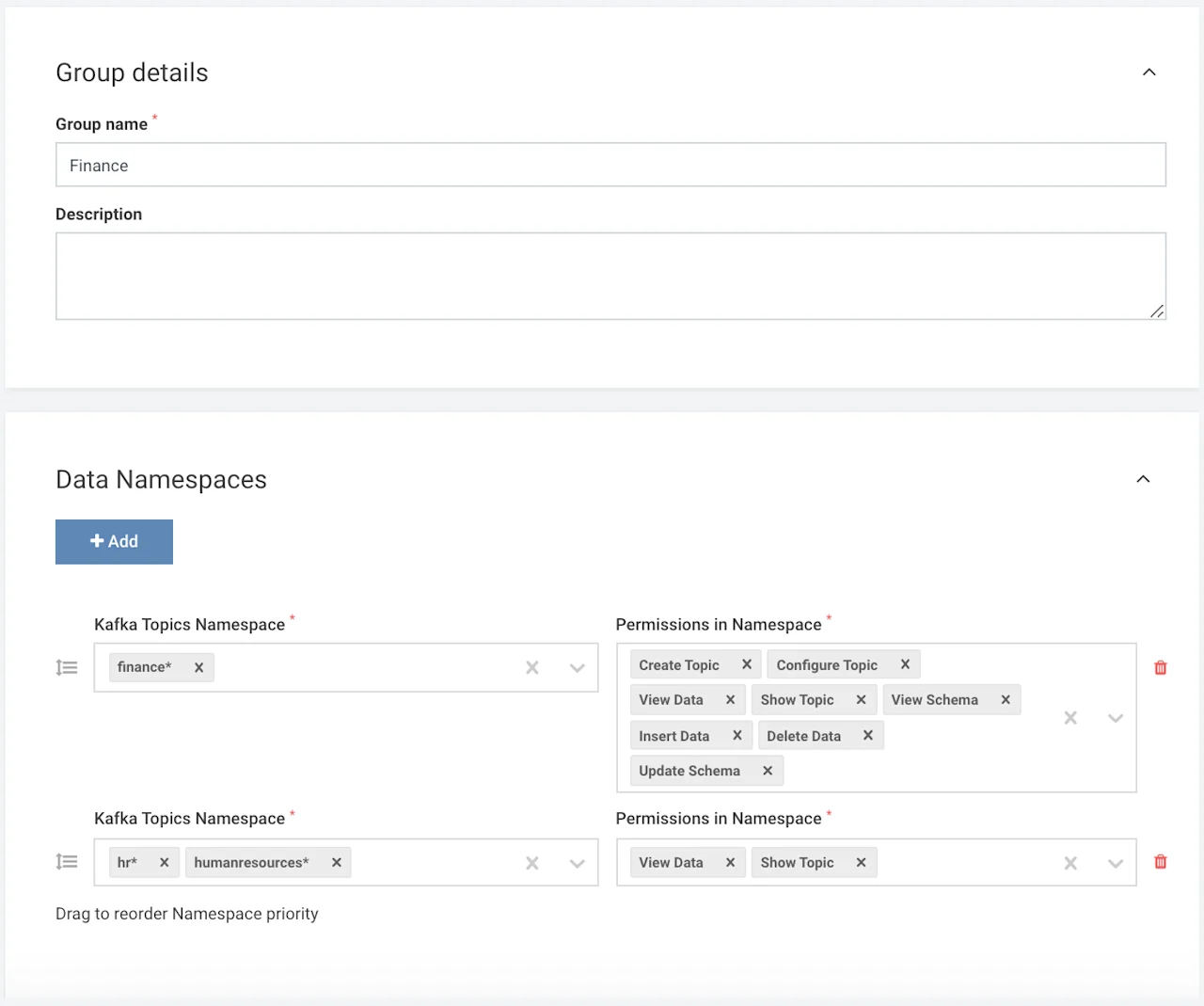
Users in group “Finance” can fully manage topics prefixed with “finance” (insert/delete/configure etc) but have a read-only view to topics prefixed with “hr” or “human resources”
Screenshot of granular permissions per namespace:
Application Permissions
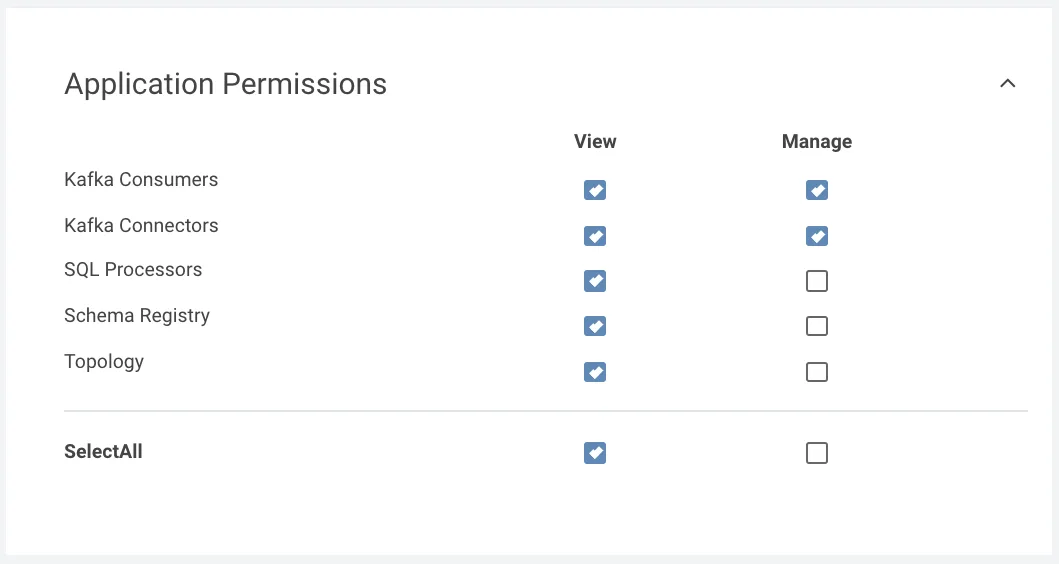
Application permissions are also affected by the summary of Namespaces. This offers better control over your data flows.
Example
For the same group “Finance”, users can fully manage (create/delete/view) Connectors (such as Kafka Connect Connectors), Consumers (such as editing committed offsets for Consumer) but only view SQL Processors, the Schemas in the Registry and the topology in the Topology view associated with the namespace (finance* and human resources*).
Admin Permissions
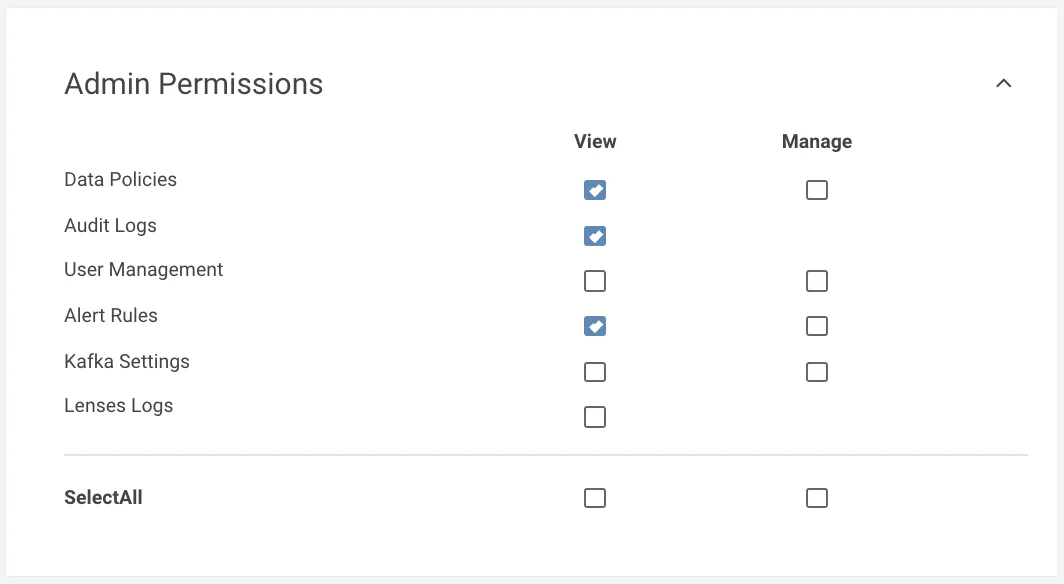
We also introduced the Admin permissions in order to allow critical actions to be finer-gained for administrators.
Example
Users in the same Finance group can view Data Policies, audit logs and view any configured alerts but cannot perform other admin actions such as view/manage Kafka settings, inspect Lenses logs and other tasks.
Connect Users & Applications
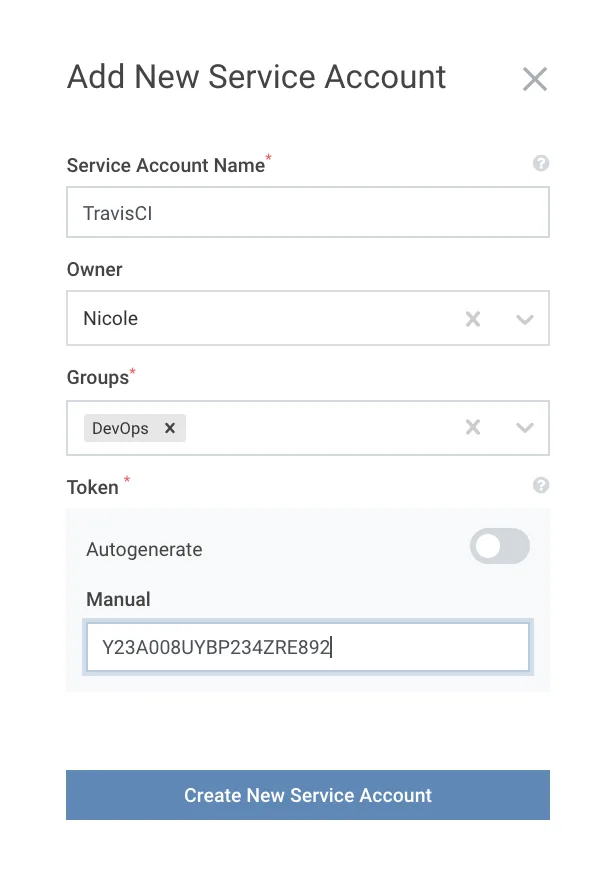
Service Accounts is a supported feature since version 2. Like User Management, Service Accounts can be managed through the Lenses Web interface as well as the CLI.
Service Accounts via a generated token are a widely adopted feature to connect custom or 3rd party applications to Lenses with default Group security applied. A very common use case is to enable GitOps and CI/CD.
Multiple Authentication methods
Lenses supports Basic Authentication where you can very simply create users and add them to groups. For those that require a higher level of compliance, Lenses supports 3rd party authentication methods such as LDAP, Active Directory, Kerberos, Okta etc.
With Lenses 3.0 we enable pluggable and multiple authentication strategies to co-exist. As Antonios mentioned in the 3.0 release “Imagine for example authenticating internal users via Kerberos and external partners via LDAP setup at the same time”.
What about Compliance?
We have expanded the granularity of audit logs in Lenses 3.0 - everything from creating a topic, logging in, deploying a connector to changing a parameter leaves a trail which can be integrated into your security solutions (such as SIEM or User Behaviour UBA tools).
Data Policies feature serves for two purposes to help meet compliance requirements:
- Mask and anonymise field-level data within the message payload
- Discover and generate an audit report of all data processed (sitting in Topics, within connectors, applications etc) that match a particular categorisation (such as PII)
More Info
Securing a data platform is one of the industry’s top concerns: it’s what we are focussing on so stay tuned for more features to come soon!
If you’re new to Lenses, checkout the security usecase page or try Lenses 3.0 in our free all-in-one Lenses+Kafka instance