Lenses MCP Server with OAuth 2.1 - build, govern & operate streaming apps securely with Agents
TL;DR
- What: Lenses MCP Server is GA with a set of Kafka tools (topics, schemas, Connect, SQL processors, consumer groups, datasets, pod logs) addressable from Claude Code, Cursor, IBM Bob, or any MCP-compatible client.
- Why it matters: OAuth 2.1 is the default, so every agent action ties back to a named engineer on a revocable token: no shared credentials, full audit trail.
- How to try it: Run one Docker command, wire up your editor, and drive Lenses from your IDE. Free in Community Edition.
Lenses MCP is GA
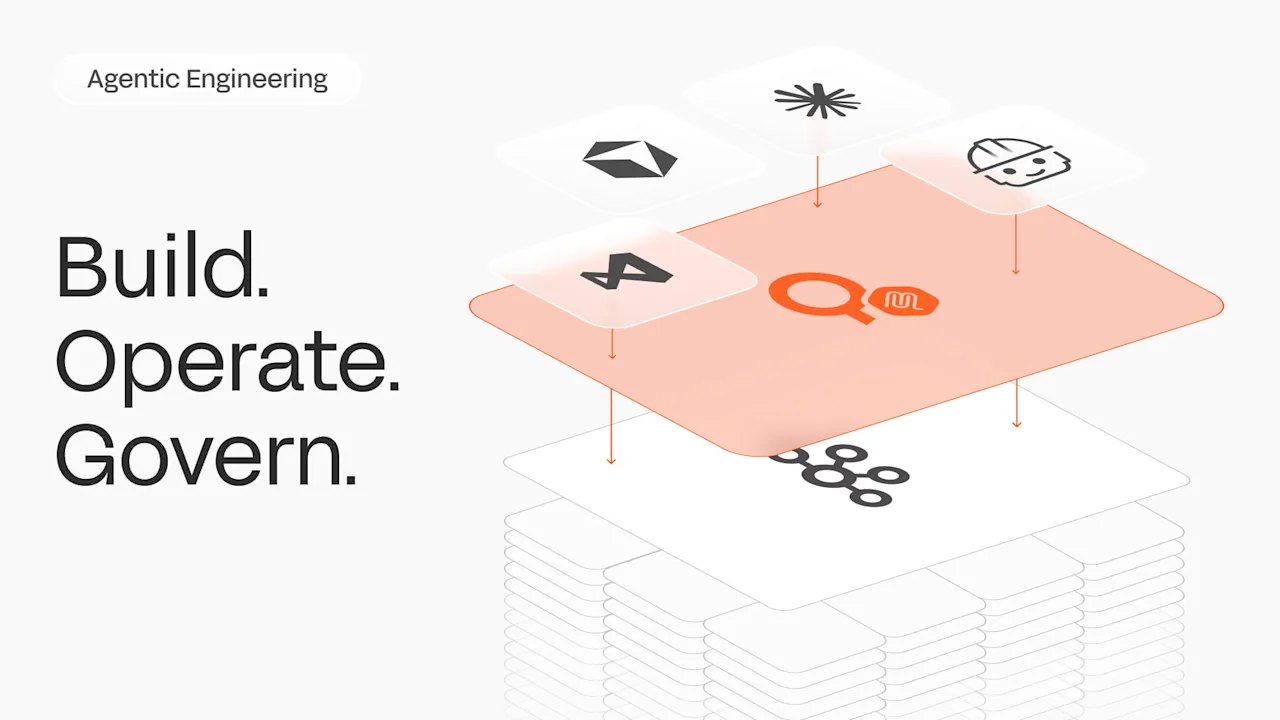
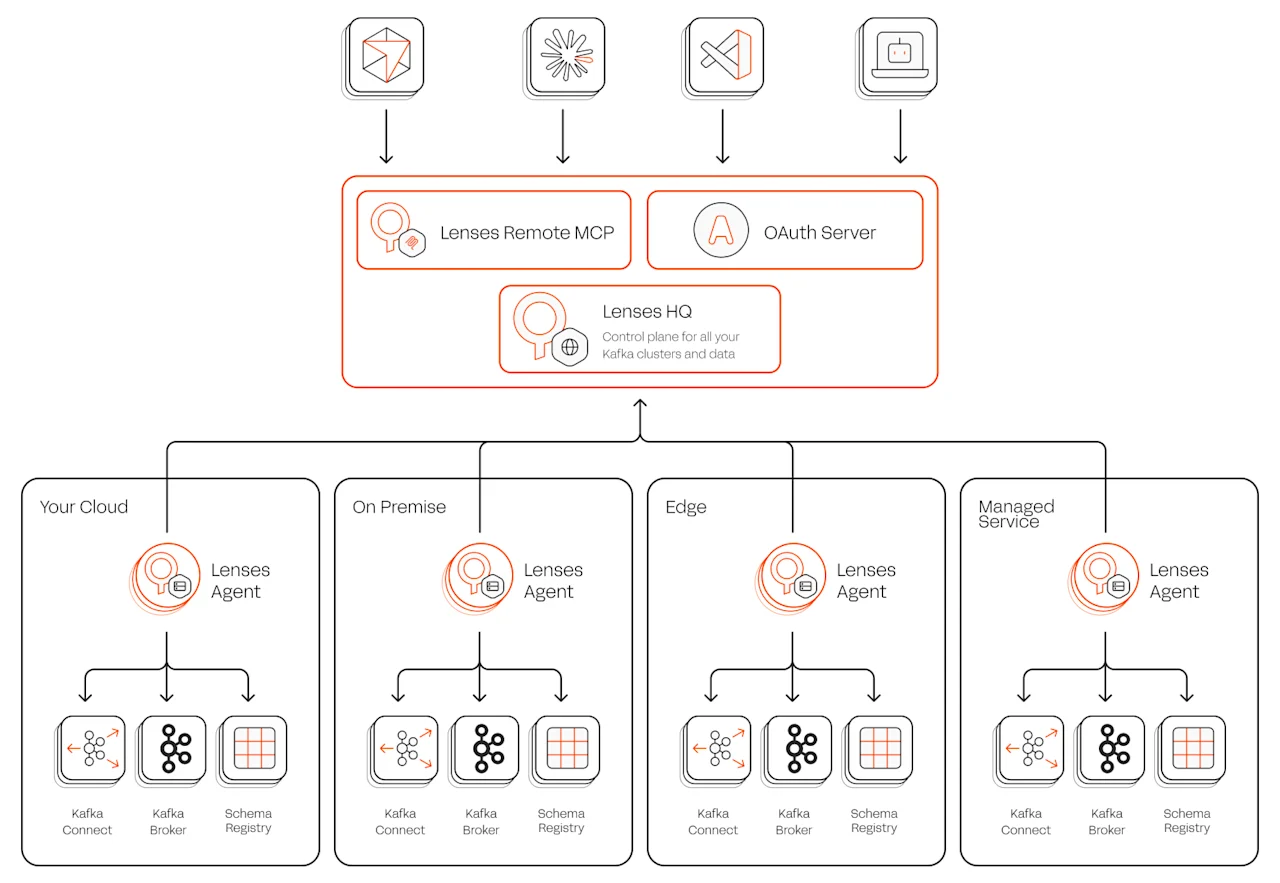
You can now drive Lenses from Cursor, VS Code, IBM Bob or Claude Code without running any extra piece of infrastructure locally. Lenses MCP offers secure tools across topics, schemas, Kafka Connect, SQL processors, consumer groups, datasets and pod logs: everything an engineer would normally click through in the Lenses UI, now reachable from any MCP-compatible client over HTTP.
Tun Shwe laid out the case for Agentic engineering on Streaming data: the bottleneck in real-time systems isn't the code. It's the cognitive load of knowing Kafka deeply enough to act safely (partitioning, retention, schema evolution, Kafka Connect quirks, processor semantics) multiplied by the context-switching between half a dozen consoles to apply any of it.
The 2025 Stack Overflow Developer Survey found that 54% of respondents report using 6 or more tools to do their job. This release is the concrete answer to that argument: the same surface, driven by an agent in your IDE or terminal, on a per-engineer OAuth token.
By the end of this post, you'll have Lenses Community Edition running on Docker, an OAuth-authenticated MCP connection from Cursor, VS Code with Copilot or Claude Code, and three working agentic workflows running against your Kafka cluster: Build a payments pipeline, debug a poison pill outage, and prepare for an audit, all from your favourite AI Agent.
What shipped
The Lenses MCP Server is generally available today in Community Edition, running as a Docker container alongside the rest of the Lenses platform, no extra configuration required, no extra dependency.
Community Edition ships with a demo single-broker Kafka cluster, so the workflows below run end-to-end without any external setup. When you're ready, point Lenses at your own clusters.
It works with any MCP-compatible client. Configuration snippets in this post cover Cursor and Claude Code, but the same setup applies to VS Code, Kiro, IBM Bob, or anything else that supports Dynamic Client Registration (DCR) and HTTP transport.
OAuth 2.1 is now the default authorization mechanism. Every action an agent takes ties back to the engineer driving it, scoped to what the session is allowed to do, revocable in seconds. This walkthrough video shows what that looks like when a client connects for the first time.
Getting it running
Deploy Community Edition with a single Docker command:
curl -L https://lenses.io/community-edition/download -o docker-compose.yml &&\
  ACCEPT_EULA=true docker compose up -d --wait &&\
  echo "Lenses.io is running on http://localhost:9991"
Now wire up your editor. The three configurations below are functionally equivalent; only the schema differs by client (Cursor uses transport, VS Code uses type).
For Cursor, add to .cursor/mcp.json:
{
  "mcpServers": {
    "Lenses": {
      "url": "http://localhost:8000/mcp",
      "transport": "http"
    }
  }
}
For VS Code, add a new MCP Server using the Configure Tools panel or edit .VS Code/mcp.json
{
	"servers": {
		"Lenses": {
			"url": "http://localhost:8000/mcp",
			"type": "http"
		}
	}
}
To play this video, accept functional cookies in your privacy settings.
Vimeo video
MCP Servers configuration on VS Code
For Claude Code, simply type this command:
claude mcp add --transport http Lenses http://localhost:8000/mcp
Restart the client and make your first tool call. It will fire the OAuth flow, and prompt for sign in with the default username/password. Approve the scopes on the consent screen and the client will pick up its token.
To play this video, accept functional cookies in your privacy settings.
Vimeo video
Lenses MCP authorization flow on Claude Code
A quick note on the agent. The walkthroughs below all use Claude Code, because that's what I drove the demo with. Everything described works the same way against any MCP-compatible client with a reasoning language model (I used Claude Opus 4.7); the agent's judgment calls are model- and prompt-dependent, but the tool surface and audit trail are not.
Workflow 1 - Ship a pipeline before the standup ends
The challenge. Standing up a new streaming pipeline takes hours, typically half a day, every one of those INSERT rows during which you design the topic and the schema, write the enrichment logic, wire it all together, and context-switch between three tools the whole time. Hand it to an agent and it collapses to one prompt.
The prompt:
Build a small enriched-payments pipeline on the Lenses demo env from scratch:
- Create a payments topic: STRING key, AVRO value, schema Payment in namespace com.example.payments with fields id:string, amount_cents:long, currency:string, merchant:string, timestamp:long (plain long, no logicalType).
- Insert 20 test records via INSERT INTO payments (_key, id, ...) VALUES (...): mix of EUR/USD/GBP/JPY with realistic merchants, _key = id = pay-001..pay-020.
- Create an IN_PROC SQL processor named payments-enrich that adds a region field via CASE on currency (EUR/GBP → europe, USD → north-america, JPY → asia, else → other) and writes to payments-enriched.
- Show me ~10 enriched records to confirm
To play this video, accept functional cookies in your privacy settings.
Vimeo video
Build a payment enrichment pipeline with Lenses MCP and Claude Code
Here's what the agent did, which turns out to be more interesting than the prompt suggests.
It loaded methodology before touching anything. Along with installing the Lenses MCP server, I wrote a custom agent skill file: a short document the agent reads before it starts reasoning about the task. It covers the two SQL dialects Lenses uses (SQL Snapshot for point-in-time snapshot queries, Processor SQL for streaming jobs), backtick quoting for hyphenated topic names, and the default deployment mode for processors in Community Edition, which is IN_PROC rather than Kubernetes. The agent reads this before calling a single tool.
It discovered the environment before assuming. list_environments returned one environment: demo. get_deployment_targets confirmed no Kubernetes targets were configured, so processors would run in-process. Two tool calls, a few seconds, and zero assumptions about what was running where.
It checked for collisions and hit real-world friction. list_topics returned a list too large for the agent to hold in context, which is the kind of problem an experienced engineer recognises instantly. It filtered the response through jq looking for anything starting with pay, confirmed nothing clashed, and moved on.
Then it built. create_topic_with_schema created the payments topic with a STRING key and an Avro value schema. A single multi-row execute_sql INSERT seeded twenty records across four currencies, with a realistic merchant mix. Lenses confirmed all 20 records inserted successfully.
It deployed the processor. Claude wrote the enrichment logic (a CASE on currency) and called create_sql_processor with auto-create enabled. get_sql_processor then returned status NOT_RUNNING. The MCP surface deliberately requires a human to start a processor. The destructive/expensive operations sit behind a UI confirmation, not a tool call, so Claude waited, polled get_sql_processor again ten seconds later, and saw RUNNING once I'd clicked start in the UI. This is a deliberate boundary: the agent gets to compose, the human gets to commit.
It verified end-to-end. A SELECT against payments-enriched with LIMIT 10 returned ten enriched records with the right region on each row: EUR and GBP in Europe, USD in North America, JPY in Japan.
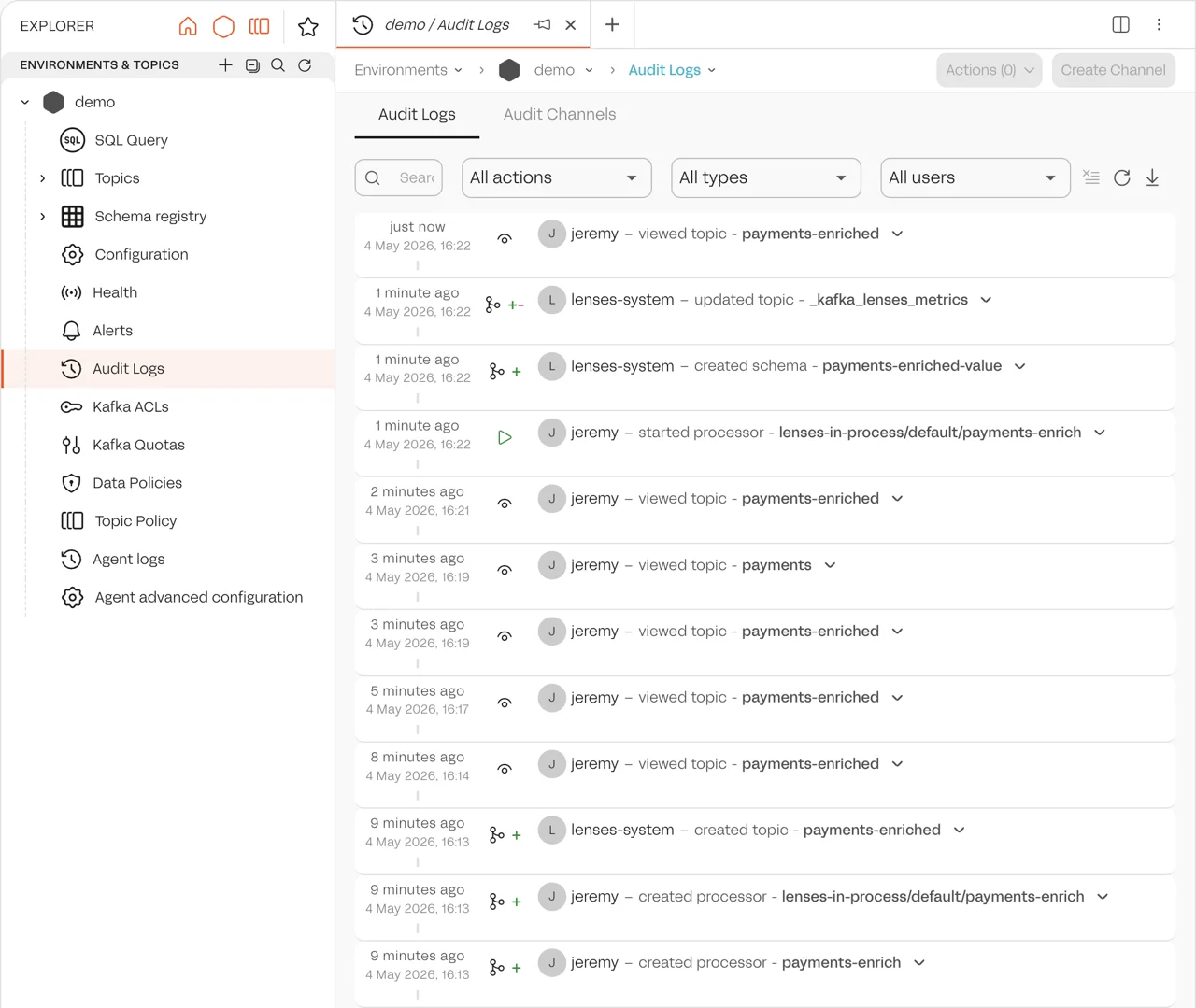
The point. The topic, the schema, the processor, every one of those INSERT rows: all of it exists in the audit trail as artefacts deployed under the user’s session. Every call is attributable to a named engineer on a specific token issued at a specific consent screen. When the auditor asks next quarter who stood up the payments-enriched pipeline, the answer is a name and a consent timestamp, not a shared credential.
Workflow 2 - Manage the consumer lag incident
It's six weeks later. The pipeline from Workflow 1 has been running in production. At 3am the pager goes. Consumer lag on payments-enriched. You don't know yet whether it's a slow consumer, a poison pill, or a dead processor, and you have three tools to open before you can even ask.
This workflow opens a fresh session with lenses:read only. Operations work under a read-only scope until something has to actually change.
To simulate a real deserialisation failure, I produced a malformed record into payments: the topic has an Avro value schema, but this record is plain JSON, so any consumer that deserialises with the schema will fail on it:
docker exec lenses-ce-demo-kafka-1 bash -c '
    i=21
    key="pay-0$i"
    payload=$(printf "{\"id\":\"pay-0%d\",\"amount_cents\":%d,\"currency\":\"EUR\",\"merchant\":\"Carrefour\",\"timestamp\":%d}" \
      $i $((RANDOM % 10000)) $((1712000000000 + i * 60000)))
    printf "%s|%s\n" "$key" "$payload" | kafka-console-producer \
      --bootstrap-server localhost:9092 \
      --topic payments \
      --property "parse.key=true" \
      --property "key.separator=|"'
The processor is now lagging.
The challenge. Consumer lag at 3am. Three tools open: kubectl, the Kafka UI, and a log tail. You're context-switching across all of them to answer one question: what's wrong, and what do I do about it?
The prompt:
The payments-enriched consumer group is lagging. Diagnose and propose a fix.
To play this video, accept functional cookies in your privacy settings.
Vimeo video
Debug a consumer lag incident with Lenses MCP and Claude Code
Here's what Claude did.
It reframed the problem from a thin signal. One line of input, no environment, no broker, no clue whether the consumer was a microservice, a Kafka Streams app, or something Lenses-managed. Claude didn't ask. It called list_environments, found the demo environment, then list_consumer_groups and immediately spotted the giveaway: the group ID was lsql-payments-enrich-0850529314. The lsql- prefix is a Lenses SQL processor convention, so the 'lagging consumer' wasn't a deployed service at all, it was a streaming SQL job. That reframed the whole investigation in one tool call.
It read the symptom honestly. The consumer group state was NoActiveMembers with lag 5–9 across 3 partitions. Low absolute lag, but no consumer attached, which means this isn't a throughput problem, it's a liveness problem. Claude didn't go hunting for slow consumers or partition skew; it pivoted straight to 'why is nothing consuming' and pulled the SQL processor record. Status FAILED, replica 0 dead with the message 'Deserialization exception handler is set to fail upon a deserialization error.' Classic poison pill, and Claude named it as such before doing any further work.
It localised the poison record using the query engine, not the broker. Rather than dumping raw bytes from Kafka, it ran SELECT _meta.partition, _meta.offset, … FROM payments LIMIT 100 through Lenses SQL Snapshot. The trick: the query engine deserialises the same way the processor does, so anything it can't decode silently drops out of the result set. The query returned 40 of 41 records, and the missing offset (partition 0, offset 9) was visible by inspection (P0 jumped from 8 to 10). Claude then back-checked the inferred committed offsets against the reported minLag=5, maxLag=9 and confirmed the math: P0 stuck at 9, P1 at 10, P2 at 3. Three independent signals, the processor logs, the query gap, the lag arithmetic, triangulated before proposing any change.
It bounded the blast radius. Claude separated recovery into 'skip the bad record now' and 'make this resilient later,' and asked before doing either. The advance-offset call only mutated one partition's committed offset; it didn't touch the processor config, didn't add a deserialisation handler, didn't drop the topic. When I said yes, Claude advanced exactly that one offset and stopped — because the MCP surface for SQL processors only exposes create/delete/get/list, not restart. Rather than improvise (delete + recreate would have minted a new processorId, abandoned the offsets it just fixed, and reset the new CG to latest, silently dropping the P1/P2 backlog), it surfaced the limitation and handed restart back to me via the UI. That's the right call: the destructive path was available and wrong, and Claude didn't take it just because it could.
It verified the fix landed. After I restarted, Claude checked the CG (state Stable, but still lagging), waited 15 seconds, re-checked, and only then reported drained, confirming with two independent signals: lag dropped to 0/0 across all three partitions, and payments-enriched ended up with exactly 40 messages, one short of the 41 input records, matching the single skipped poison pill.
It surfaced residual risk. The fix unblocked the pipeline but didn't solve the underlying problem. Some producer is still capable of emitting records that Avro can't decode, and the processor is still configured to die on the next one. Claude flagged all of it in the closing summary (set LogAndContinueExceptionHandler, add a DLQ, chase the producer) without conflating 'drained' with 'fixed,' and offered a scheduled follow-up rather than assuming I wanted one.
Workflow 3 - Pass the audit without the wiki page
A new compliance audit is coming up next quarter, and someone has to walk the auditor through what's in Kafka, who owns it, and which topics carry sensitive data. Today that work lives in a half-maintained wiki page; tomorrow it lives in Lenses metadata, queryable in the same audit trail as everything else.
The prompt:
Audit metadata coverage on topics in the demo environment
To play this video, accept functional cookies in your privacy settings.
Vimeo video
Review the topic metadata coverage with Lenses MCP and Claude Code
Here's what Claude did. It's quieter than Workflow 2, but it tells the same story from the other side of the platform.
It discovered the environment before assuming. list_environments returned demo with num_policies:0. There are no masking or access policies wired up, so any classification work being proposed is greenfield rather than aligning to an existing scheme. One tool call, immediate context.
It pulled metadata in a single call, not sixteen. list_topic_metadata returned all 16 topics with their descriptions, tags, schemas, and key/value types in one payload. Claude classified eight as control topics by name (__consumer_offsets, _schemas, connect-*, _kafka_lenses_metrics, topology*) and audited the remaining eight. Six already had owner tags, descriptions, and risk classifications. Two had nothing: payments and payments-enriched.
It inferred owner without asking. Both payments topics share an obvious domain prefix, so the proposal was owner:payments for both, with payments-enriched inheriting from its source per the sink-topic rule. The PII call was the more interesting one: the payments schema has id, amount_cents, currency, merchant, and timestamp. No names, no card numbers, nothing that screams PII. But the skill's heuristic flags financial transactions with external join keys as PII by linkage, because a pay-NNN style identifier may join back to customer records elsewhere. Claude tagged both topics pii:linkage on that basis and surfaced the reasoning in the proposal.
It offered batch options, not free-form prompts. The proposal ended with three explicit choices: apply all as-is, apply non-flagged only, or per-topic. I picked per-topic. Claude then walked through each topic in turn with five options each (yes / no / edit / description-only / tags-only), so each turn was a single character.
It applied changes in parallel, not serially. For each topic, update_dataset_topic_description and update_dataset_topic_tags went out in the same tool block. Two tool calls, one round-trip. Both topics done in two turns
In summary
Three sessions, three different shapes of work, one platform surface.
What's consistent across all of them is the part you don't see in a screencast: scoped tokens, a real audit trail, and a tool surface designed to keep destructive moves in human hands.
Build sessions can write; operate sessions start read-only and escalate one offset at a time; govern sessions touch metadata only. Every call lands under a named engineer's session on a token issued at a consent screen, queryable later by name and timestamp, not 'the data team did it sometime.'
What's also consistent is what the agent didn't do. It didn't restart the failed processor by deleting and recreating it. It didn't start the new processor without a human in the loop. It didn't classify topics by guessing. The MCP surface and the skill file together drew the lines; the agent stayed inside them.
That's the shape we want for agents on production data infrastructure: composition, not commitment. The agent does the boring 80% — discovery, drafting, verification, arithmetic — and the human stays on the hook for the moves that matter.
What's next
The available tools currently enable application development, data streaming infrastructure operation and data governance workflows. Expect coverage to expand into more of the Lenses platform capabilities in Q2: additional surfaces becoming addressable from an agent, with the same audit-trail guarantees as the ones above. We'll also be publishing tested configurations for more MCP-compatible clients beyond Cursor, VS Code, and Claude Code as we validate them.
On the authorization side, finer-grained scopes and content-aware controls are landing soon: read more about Enterprise-grade authorizations for MCP.
Frequently asked questions
What is the Lenses MCP Server?
The Lenses MCP Server is a remote Model Context Protocol server that exposes Kafka management tools (topic creation, schema management, Kafka Connect, SQL processors, consumer group operations, dataset queries, and pod logs) to any MCP-compatible AI client. It runs as a Docker container alongside the rest of the Lenses platform and communicates over HTTP. Engineers can drive Kafka from Claude Code, Cursor, VS Code, Codex or any other MCP client instead of clicking through the Lenses UI.
Which MCP clients does the Lenses MCP Server support?
Any MCP-compatible client that supports HTTP transport and Dynamic Client Registration (DCR). The post documents tested configurations for Claude Code, Cursor, and VS Code. The same setup applies to Kiro, IBM Bob, and other DCR-capable clients.
Is the Lenses MCP Server free?
Yes. The Lenses MCP Server is generally available in Lenses Community Edition, which is free and runs locally on Docker. A single command installs the entire Lenses platform including the MCP Server.
How does authentication & authorization work?
OAuth 2.1 is the default authorization mechanism. When an MCP client connects for the first time, it triggers an OAuth flow: the user authenticates, approves the requested scopes on a consent screen, and the client receives a token scoped to that session. Every tool call the agent makes is attributable to the named user who issued the token, and tokens are revocable in seconds.
Is it safe to let an AI agent run Kafka operations?
The Lenses MCP Server is designed around the principle that agents compose and humans commit. Destructive or high-impact operations (starting an SQL processor, restarting a connector) sit behind a UI confirmation rather than being exposed as tool calls. Agents can draft, deploy, and verify, but a human approves the moves that matter. Combined with per-engineer OAuth tokens and a full audit trail, this gives security and platform teams the same controls they already have for human operators.
How do I install the Lenses MCP Server?
Run a single Docker command:
curl -L https://lenses.io/community-edition/download -o docker-compose.yml &&
Then add the MCP server to your editor configuration.
For Claude Code: claude mcp add --transport http Lenses http://localhost:8000/mcp
For Cursor and VS Code, add an entry to mcp.json pointing to http://localhost:8000/mcp.
The first tool call will trigger the OAuth flow.
What does the audit trail capture?
Every tool call made through the MCP Server is recorded against the OAuth session that issued it, including the user’s identity and the API invoked. Topics created, schemas registered, processors deployed, and consumer group offsets updated are all attributable to a named user rather than a shared service account.
Try it now
- Download Community Edition
- Read the MCP docs
- Star the Lenses MCP Server github repository
- Clone the agentic engineering skills pack and star it while you're there
- Read the Lenses 6.2 release post for the broader context