
As mentioned in previous post,
Lenses SQL leverages Kafka Streams to process data and currently provides 3 execution modes
to run Lenses SQL processors. In this video we demonstrate how to scale out using CONNECT mode
as well as how to manage the Lenses SQL processors via the Lenses web interface or the CLI tool.
About Lenses SQL Processor modes
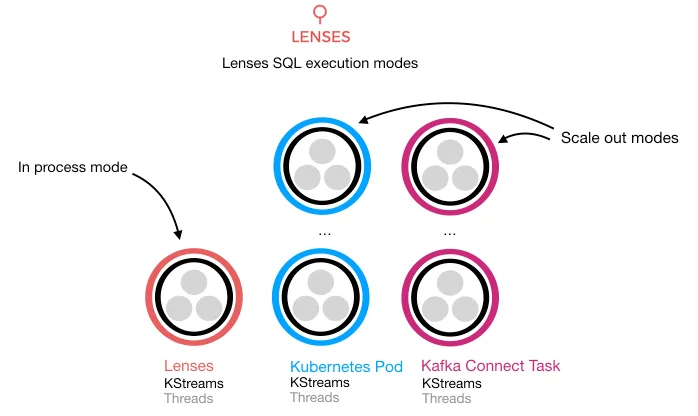
IN_PROC
This can have scalability issues and poses a risk to the running application, and can affect stability.
IN_PROC is recommended only for testing.
CONNECT
Lenses can deploy your Lenses SQL processors in Kafka Connect. Kafka Connect provides a distributed,
fault tolerant and scalable framework as part of the core Apache Kafka distribution.
KUBERNETES
is an execution mode that provides scalability by deploying Lenses SQL runners into Kubernetes clusters.
Lenses can deploy and monitor SQL runner deployments created through Lenses or existing tools such as Helm or kubectl
Additional Resources
Find out more about Lenses & Lenses SQL Processors: Lenses Documentation
Download Lenses Now at Downloads Page
Relevant Blogs