Angelos Petheriotis, Senior Data Engineer at Centrica (Hive Home/British Gas) shares parts of their data journey,
building IoT realtime data pipelines with Stream-Reactor, Kafka and Kubernetes.
Driving billions of messages per day through multiple processing pipelines requires a significant amount of
processing and persisting jobs. We designed our pipelines having in mind a real time, durable and stable continuous
data pipeline. In order to achieve this goal we made our services and our infrastructure as decoupled as possible.
Centrica launched Hive in 2013 with customers telling us they wanted comfort and convenience, and a thermostat they
could control that was easy and simple to use. Today, with £500m investment into Centrica Hive Limited, from parent
company Centrica plc, the Hive ecosystem of connected products has grown its range and geographical market, to give
people new ways to control their homes, their comfort, and their energy usage. Hive is possibly one of the largest
and most mature IoT deployments in the UK utilizing Kafka.

In this post, we will present the way we evolved our systems architecture over the past few years, and how we are implementing
the “single responsibility” principle, resulting into a design that has been proven to work and scale quite easily.
Implementing the single responsibility
Let’s get through a simple example of our way of implementing pipelines. Take for example the following requirement.
We need a real-time pipeline that receives 10 billion temperature reads a day (in a streaming way, evenly
distributed) group them by specific time-window and store the results to a data-store. In our case we are using
Elasticsearch and Cassandra.
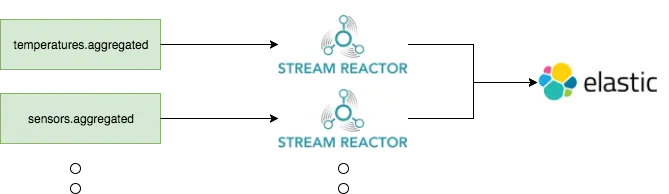
The way we approached the above requirement was to decouple the data-pipeline by implementing two jobs,
as shown in the following figure.

We split the pipeline into 2 main units: the aggregator job and the persisting
job. The aggregator has one and only one responsibility: to read from the input Kafka topic, process the messages and
finally emit them to a new Kafka topic. The persisting job then takes over and whenever a message is received from
topic temperatures.aggregated
The above approach might seem to be an overkill at first but it provides a lot of benefits (but also some
drawbacks). Having two units means that each unit’s health won’t directly affect each other. If the processing job
fails due OOM, the persisting job will still be healthy.
One major benefit we’ve seen using this approach is the replay capabilities this approach offers. For example, if
at some point we need to persist the messages from temperatures.aggregated
of wiring a new pipeline and start consuming the Kafka topic. If we had one job for processing and persisting, we
would have to reprocess every record from the thermostat.data
Issues with Spark Streaming
For data processing, we initially set up a Spark Cluster with 300+ GB RAM, and then we implemented numerous projects,
one for every step of the data pipeline. Of course infrastructure is one part of the equation, but over time this setup
also resulted to multiple GitHub repositories. Each of them requiring both maintenance, as well as the full SDLC: multiple
CI pipelines, compiling, unit-testing, building JAR as well as multiple CI jobs for deploying executing and managing
these jobs.
Another issue was utilization and job isolation. Our Spark cluster was either remaining partially idle, or
being too busy. Another one was job isolation, a mis-behaving job could affect the entire cluster.
So the key issues identified with our initial approach were:
- Too many GitHub projects, CI pipelines and high maintenance
- Poor resource utilization
- No Job isolation
Big wins with Kafka Connect and Kubernetes
At that point, we took a step back and started evaluating Kafka Connect. The end result was to replace 90% of our
spark persisting jobs with Kafka Connect jobs! Today, persisting data from a topic to datastore is a matter of a few
lines of configuration and then kubernetes takes over and deploys a kafka-connect cluster.
In order to achieve the config based plumping approach, we used stream-reactor
Apache 2.0 licensed Kafka connectors with Kafka Connect Query Language (part of Lenses SQL). It offers a SQL like syntax
that automatically instructs the Kafka cluster with what input topic(s) to use, which fields to extract from each
message and what transformations to apply to it.
You can find an example configuration of a job that reads from a topic and persists data
to Elasticsearch below:
```
"name": "temperatures-to-elasticsearch",
"config": {
  "connector.class":
  "com.datamountaineer.streamreactor.connect.elastic.ElasticSinkConnector"
  "tasks.max": ${MAX_TASKS}
  "topics": "temperatures.grouped"
  "connect.elastic.url":
  "elasticsearch://"${ELASTIC_SEARCH_HOST}":"${ELASTIC_SEARCH_PORT}
  "connect.elastic.cluster.name": ${ELASTIC_SEARCH_CLUSTER}
  "connect.elastic.kcql": "INSERT INTO temperatures SELECT * FROM
  temperatures.grouped WITHINDEXSUFFIX -{YYYY.MM.DD}"
  "connect.elastic.index.auto.create": ${ELASTIC_SEARCH_INDEX_AUTO_CREATE}
}
```
By using dockers, kubernetes and Helm charts, we progressed from a monolithic approach of Spark streaming, that
required managing lots of code into simple config based tasks to persisting data to data stores.
The following image illustrates the benefits of the second iteration:
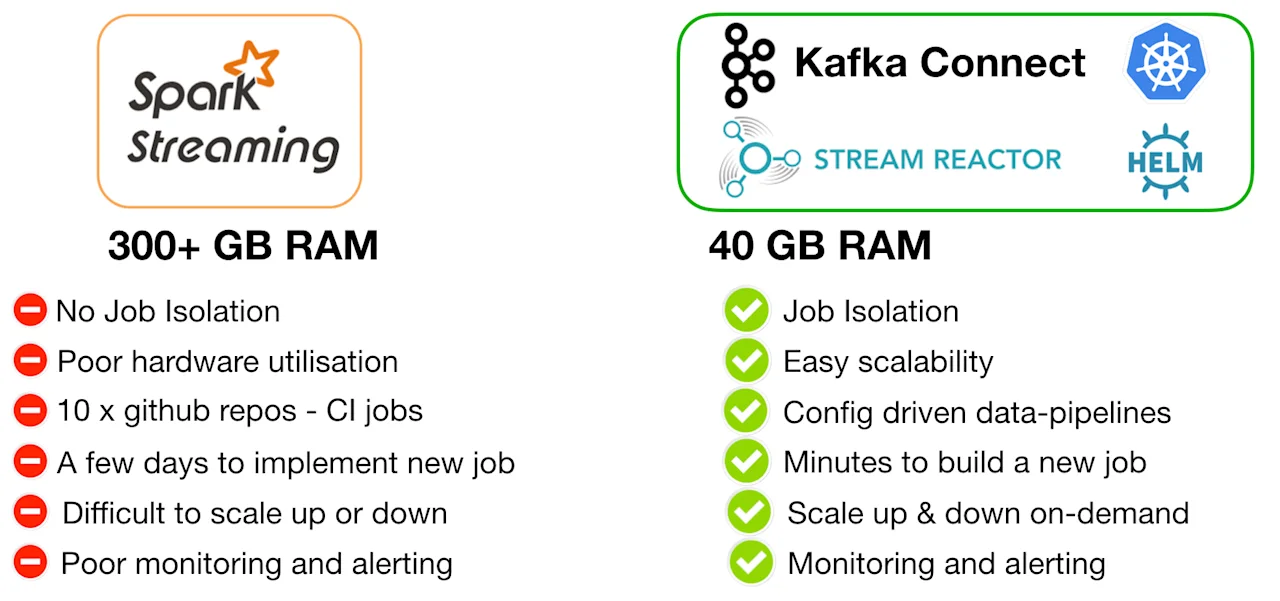
Let’s look a bit more on some of those points.
Job Isolation
With Kubernetes, we executed 10-15 Kafka Connect clusters (each one with 3 Connect workers, and a default parallelization
of 3 tasks) allocating 3 GB RAM to each connect cluster.
Resource Utilization
In Kubernetes each pod is pre-allocated a specific amount of Resources: “Use what you need”.
Kubernetes was a key decision to our architecture, that helped among other to bring the cost of infrastructure down.
Engineering Effort
With Stream-Reactor Kafka Connectors we now need to manage only 2 to 3 parameters.
Using Stream-Reactor
Stream-Reactor is a large collection of open-source Kafka Connectors. One of the main benefits is the simplicity of
configuring them and advanced capabilities. To configure a connector you effectively need to configure:
- the level of parallelization
- the routing
- any advanced configs
For example with Elasticsearch, we had to deal with numerous topics and different business requests.
The Kafka Connectors made it easy to select which data and how they will be stored, via a simple query:
```
-- Insert to elastic index some fields from topicA using device-id as a
Primary Key
UPSERT INTO indexA SELECT sensor.*, device.* FROM topicA PK device.id
```
Multiple routing settings can also be configured using the ;
can be routed to multiple target Elasticsearch indexes, by a single connector that polls every message just once
```
-- Multiple elasticsearch routing instruction
INSERT INTO indexA SELECT sensor.* FROM topicA; INSERT INTO indexB SELECT
device.* FROM topicA
```
Dealing with errors
A few error conditions that could occasionally occur, were easy to be handled. The stream-reactors connectors provide
configurable error policies. The RETRY
if an Elasticsearch instance was restarted for maintenance. The NOOP
expect a malformed message, so that the connector will skip and continue. The THROW
connector to throw a stack-trace and exit, indicating an issue, ensuring that we can have confidence that every single
message has been sinked correctly (think of exactly-once-semantics).
Managing Billions of events in Elasticsearch
Writing billions of events into Elasticsearch every day, creates an issue regarding managing persistence. To overcome
this we utilized a feature of the elastic KCQL connector
.. FROM topicA WITHINDEXSUFFIX={YYYY-MM-dd}
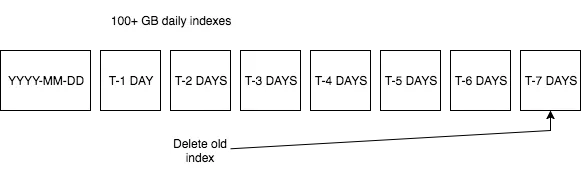
That results into every day persisting data into different indexed in Elasticsearch. And this allows us to control the
total number of open Indices, and for example close and retire any index that is older than 7 days.
How stream analytics evolved
Analytics and in particular aggregation jobs is a significant part of what we do. We started working with KStreams, that
is a library that provides low latency and has an easy-to-use event time support. Initially we had some challenges around
managing state. Once overcome (and based on the fact that we had a Kafka centric approach) it made sense for our
use cases. KStreams was also a very good fit for our Kubernetes cluster, as state-less applications were easily ported
into the rest of the infrastructure.
A high level overview of our current view of the world
So how does our Kubernetes cluster now looking? We are deploying multiple KStream applications and multiple Kafka
Connect clusters utilizing stream-reactor to build data pipelines. Here we are following again the single responsibility
principle discussed earlier.
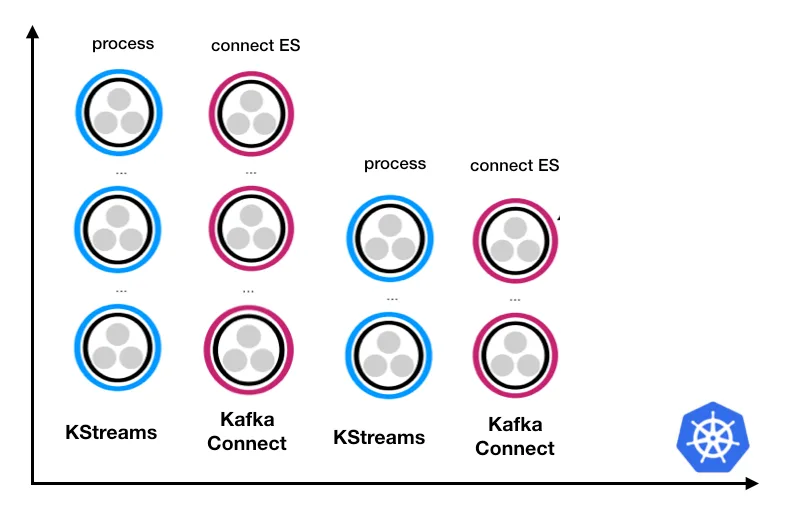
We are using multiple Kafka Connect clusters and multiple Kstreams clusters. For every step of a data pipeline, a set of state-less microservices form into a cluster.
The lesson learned here, is that it’s always better to employ i.e. 10 or 15 Kafka connect clusters, each with 3 workers (for both fault tolerance as well as parallelization) rather than 1 single large Kafka connect clusters, running 15 connectors.
Having isolation in your design, means that for example a Cassandra connector is not going to effect an Elasticsearch connector. If part of the system misbehaves it will not affect all the pipelines. Running multiple connectors on the same Connect cluster, also occasionally results into rebalances of tasks and workers, affecting the entire connect cluster.
This design also makes monitoring straight forward for Kafka connect. We enable the JMX metrics that kafka-connect
provides and we just forward them to our monitoring infrastructure.
Conclusions
Bringing Kubernetes into our architecture, helped us automate and streamline not only our infrastructure, but also our processes around data-pipeline automations (with minimal coding effort), allowing us to tackle the more challenging aspect of machine learning and complex event processing requirements.
Stream-Reactor is a collection of Apache 2.0 Kafka Connectors that is both feature-rich and battle tested. Elasticsearch is an excellent fit for IoT projects, and via the Kibana integration and end-points can enable the ability to query over IoT data in scale. Approaching data-pipelines via infrastructure-as-code
single-responsibility
As everything is better, faster and more simple when you visualize it, we use kafka-connect-ui
Whats next
SQL over streaming data these days seems to be simplifying both aggregations and analytics especially when it comes with cool tooling, and based on state-less application logic it makes it a good fit for Kubernetes that has been proven to work and scale.