
An FTP server, together with a pair of credentials is a common pattern, on how data providers expose data as a service.
In this article we are going to implement custom file transformers to efficiently load files over
FTP and using Kafka Connect convert them to meaningful events in Avro format.

Depending on data subscriptions we might get access to FTP locations with files
updated daily
weekly
monthly
XML or even binary.
On IoT use cases we might need to flatten multiple events arriving in a single line or
apply other transformations before allowing the data to enter the Kafka highway as a stream of meaningful
messages.
Kafka Connect distributed workers can provide a reliable and straight forward way of
ingesting data over FTP. Let’s now look at some real IoT cases with data delivered on FTP
and how to load them into Kafka:
- XML
- CSV
- Binary
XML : Irradiance Solar data
The first data set is available through FTP and multiple XML files that contain data
per day for numerous geo-locations in the world:
```
<SOAP-ENV:Envelope xmlns:SOAP-ENV="http://schemas.xmlsoap.org/soap/envelope/">
  <SOAP-ENV:Header>
    <wsse:Security xmlns:wsse="http://docs.oasis-open.org/wss/2004/01/oasis-
    200401-wss-wssecurity-secext-1.0.xsd" xmlns:wsu="http://docs.oasis-
    open.org/wss/2004/01/oasis-200401-wss-wssecurity-utility-1.0.xsd" SOAP-
    ENV:mustUnderstand="1">
      <wsu:Timestamp wsu:Id="AB-1234">
        <wsu:Created>2016-12-02T00:13:11.807Z</wsu:Created>
        <wsu:Expires>2016-12-02T00:18:11.807Z</wsu:Expires>
      </wsu:Timestamp>
      <wsse11:SignatureConfirmation xmlns:wsse11="http://docs.oasis-
      open.org/wss/oasis-wss-wssecurity-secext-1.1.xsd" wsu:Id="SC-2947"/>
    </wsse:Security>
  </SOAP-ENV:Header>
  <SOAP-ENV:Body>
    <ns2:dataDeliveryResponse xmlns:ns2="http://geomodel.eu/schema/ws/data"
    xmlns:ns3="http://geomodel.eu/schema/common/geo">
      <ns2:site id="site-ID-1234" lat="56.3491" lng="-2.41118">
```
Note in the above block the last line. The siteID
lat
lng
The XML file continues with the entries:
```
   <ns2:row dateTime="2016-12-01T00:18:00.000Z" values="1.2"/>
        <ns2:row dateTime="2016-12-01T00:33:00.000Z" values="12.5"/>
        ...
```
All we need to do is to define a case class and provide a class implementingSourceRecordConverter
into messages:
```
package com.landoop

import com.datamountaineer.streamreactor.connect.ftp.source.SourceRecordConverter

import scala.collection.JavaConverters._import java.util

import org.apache.kafka.connect.source.SourceRecord

class IradianceXML extends SourceRecordConverter {

  override def configure(props: util.Map[String, _]): Unit = {}

  override def convert(in: SourceRecord): util.List[SourceRecord] = {
    val line = new String(in.value.asInstanceOf[Array[Byte]])
    val data = scala.xml.XML.loadString(line)

    val siteID = (data \\ "site" \ "@id").toString
    val lat = (data \\ "site" \ "@lat").toString.toDouble
    val lng = (data \\ "site" \ "@lng").toString.toDouble

    val rows = (data \\ "row").map { rowData =>
      val dateTime = (rowData \ "@dateTime").toString
      val value = (rowData \ "@values").toString.toDouble
      val message = IradianceData(siteID, lat, lng, dateTime, value)
      new SourceRecord(in.sourcePartition, in.sourceOffset, in.topic, 0,
      message.connectSchema, message.getStructure)
    }
    rows.toList.asJava
  }}

```
In no more than 30 lines of code, we have encapsulated the entire parsing logic into a RecordConverter.
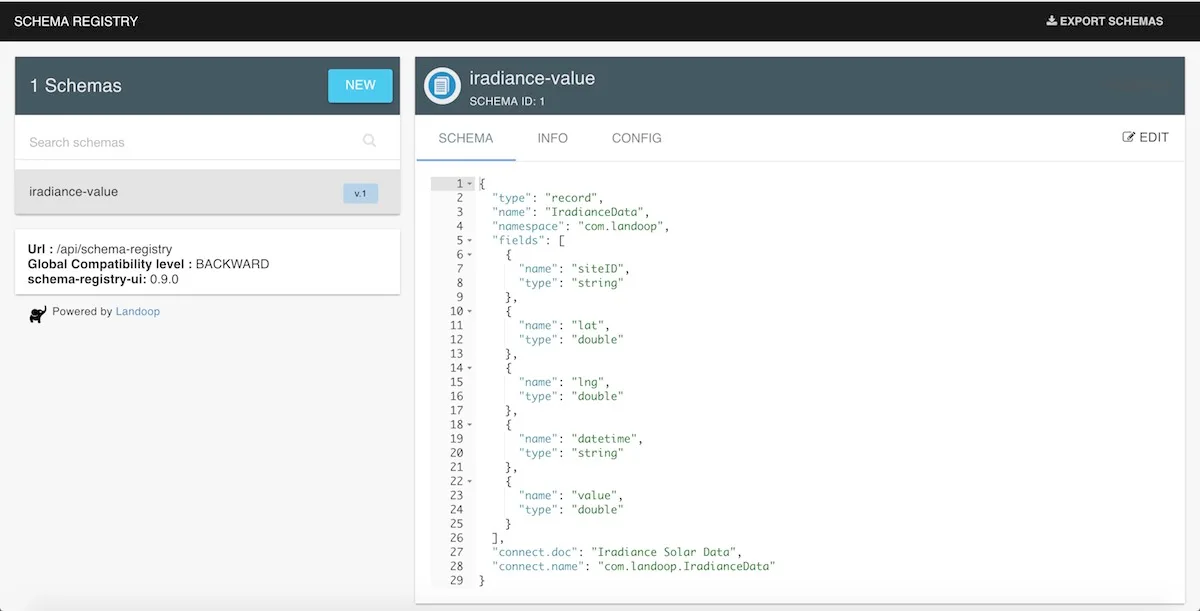
The data contract is inside a case class that provides access to the schema and a converter to an Avro structure.
```
case class IradianceData(siteID: String,
                         lat: Double,
                         lng: Double,
                         datetime: String,
                         value: Double) {

  val connectSchema: Schema = SchemaBuilder.struct()
    .doc("Iradiance Solar Data")
    .name("com.landoop.IradianceData")
    .field("siteID", Schema.STRING_SCHEMA)
    .field("lat", Schema.FLOAT64_SCHEMA)
    .field("lng", Schema.FLOAT64_SCHEMA)
    .field("datetime", Schema.STRING_SCHEMA)
    .field("value", Schema.FLOAT64_SCHEMA)
    .build()

  def getStructure: Struct = new Struct(connectSchema)
    .put("siteID", siteID)
    .put("lat", lat)
    .put("lng", lng)
    .put("datetime", datetime)
    .put("value", value)}
```
Get the code from GitHub,
build the JAR file with sbt assembly
Next we can instruct the connector to use it via setting the property sourcerecordconverter
com.landoop.IradianceXML
```
cat << EOF > iradiance-ftp-source-connector.json
{
  "name": "iradiance-ftp",
  "config": {
    "tasks.max": "1",
    "connector.class": "com.datamountaineer.streamreactor.connect.ftp.source.FtpSourceConnector",
    "connect.ftp.address": "192.168.0.15:21",
    "connect.ftp.user": "Antwnis",
    "connect.ftp.password": "********",
    "connect.ftp.refresh": "PT1M",
    "connect.ftp.file.maxage": "P14D",
    "connect.ftp.keystyle": "struct",
    "connect.ftp.monitor.tail": "iradiance/*.xml:iradiance",
    "connect.ftp.sourcerecordconverter": "com.landoop.IradianceXML"
  }
}
EOF

curl -X POST -H "Content-Type: application/json" -H "Accept: application/json" -d @iradiance-ftp-source-connector.json \
  http://192.168.99.100:8083/connectors
```
What we have achieved, is setting up and posting to Kafka Connect distributed, a connector that tails all files
newer than 14 days P14D
iradiance/*.xml
(1 minute) PT1M
Timings are provided in the
format.iso8601 duration
When the first XML file is consumed, a number of events are generated in Avro format. The first message is checked
against the schema-registry, and as no such Avro subject is yet registered, it will register it automatically:
By using the kafka-topics-ui we can also see the data landing into the topic:
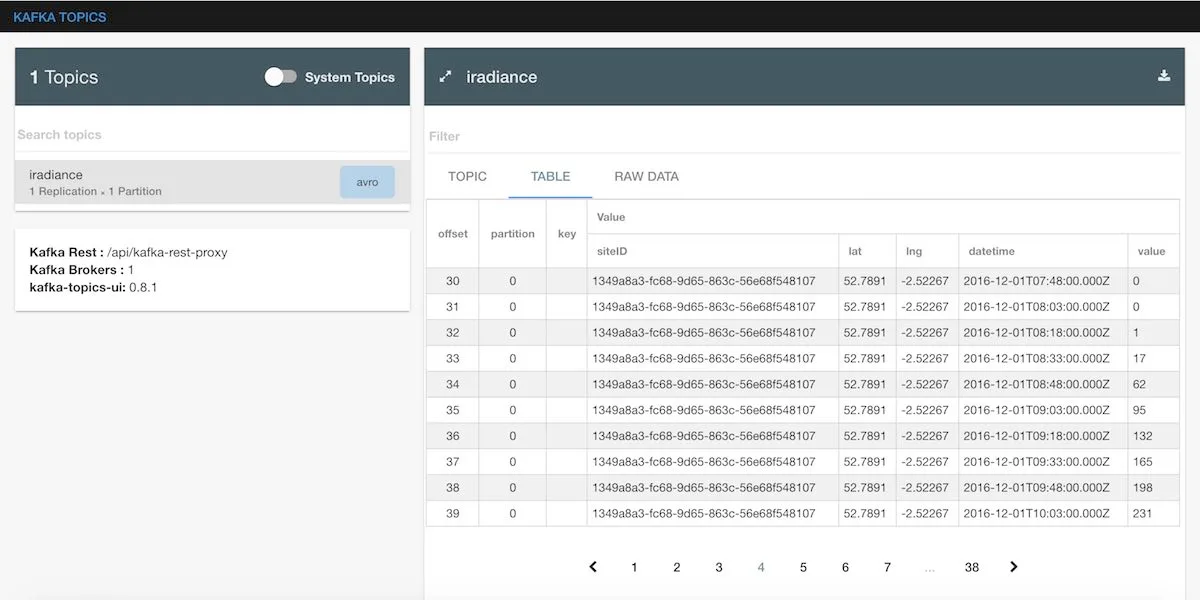
As instructed, a single XML file is parsed into multiple messages, that each one makes sense in isolation, thus are
converted to streaming-events. The solar irradiance seems to be picking up in the morning hours.
Every time an XML file is consumed and multiple new Avro messages are generated into Kafka, a record is automatically added
in the connect-offsets
```
{
  "key": "[\"iradiance-ftp\",{\"path\":\"iradiance/2017-02-13-iradiance.xml\"}]",
  "value": "{\"lastmodified\":1486640864308,\"timestamp\":1486631400000,\"size\":8671,\"firstfetched\":1486640864264,\"hash\":\"3bb2154287499b4a57444906b2dfbe3c371a
  7b255b8aeeae676a885f1c16903a\",\"lastinspected\":1486640864308}",
  "partition": 0,
  "offset": 17
}
```
The above record acts as the high watermark
increased in size will be consumed. So, similarly to Camel
a state-less micro service that preserves state and data in Kafka.
Horizontal CSV files (monthly)
Let’s look at some CSV files delivered over FTP. Horizontal files, come in with some metadata columns, followed by a
date column and then by 24 or 48 comma separated set of numbers that indicate a reading every 60 minute or 30 minute time
interval in that day.
DeviceID_1234_foo,21/01/2017,1.5,1.6 … 10.2,10.4,10.2,12.6,11.2,9.5,8.8
A compacted time-series in plain sight, requires a simple transformation to break it down
to simple events and then send them to Kafka in records, ready to be consumed by downstream apps.
```
package com.landoop

import java.util

import com.datamountaineer.streamreactor.connect.ftp.source.SourceRecordConverterimport com.typesafe.scalalogging.slf4j.StrictLoggingimport org.joda.time.format.{DateTimeFormat, DateTimeFormatter}import org.apache.kafka.connect.source.SourceRecord

import scala.collection.JavaConverters._import org.joda.time.DateTime

class HorizontalMonthlyCSV extends SourceRecordConverter with StrictLogging {

  override def configure(props: util.Map[String, _]): Unit = {}

  val dateFormat: DateTimeFormatter = DateTimeFormat.forPattern("dd/mm/yy")

  override def convert(in: SourceRecord): util.List[SourceRecord] = {
    val line = new String(in.value.asInstanceOf[Array[Byte]])
    val tokens = Parser.fromLine(line)
    val id = tokens.head
    val day = DateTime.parse(tokens(1), dateFormat)
    val readings = tokens.drop(2)

    val minutes = 1440 / readings.length
    logger.debug(s"Monthly CSV parser with 1 entry every $minutes minutes")
    val eventsList = readings.indices.flatMap { index =>
      val value: String = readings(index)
      val parsedDouble = parseDouble(value)
      if (parsedDouble.isDefined) {
        val newTime = day.plusMinutes(index * minutes).getMillis / 1000
        val event = DeviceEvent(id, newTime, parsedDouble.get)
        Option(new SourceRecord(in.sourcePartition, in.sourceOffset, in.topic, 0, event.connectSchema, event.getStructure))
      }
      else None
    }.toList
    eventsList.asJava
  }

  def parseDouble(s: String): Option[Double] = try { Some(s.toDouble) } catch { case _ : Throwable => None }}

```
The above code will cater for entries coming with missing values. We have defined the specifications of the connectors as
Scala spec tests:
```
"allow missing reading" in {
  val line =
    """ABCDEFG_214669932_Import,21/01/2017,1.4,1.3,1.7,1.3,1.5,,,,,,,,12.5,,,,,,,,,,,,,,,,,,,,,,,,,,,,,,,,,,,"""
  val inputLineRecord = new SourceRecord(sourcePartition, sourceOffset,
  "topic", 0, null, line.getBytes)
  val convertedRecords = new HorizontalMonthlyCSV().convert(inputLineRecord)
  convertedRecords.size shouldBe 6}
```
All we need to do is send a request for a new CSV (horizontal) files with:
```
cat << EOF > horizontal-csv-ftp-source-connector.json
{
  "name": "horizontal-ftp",
  "config": {
    "tasks.max": "1",
    "connector.class": "com.datamountaineer.streamreactor.connect.ftp.source.FtpSourceConnector",
    "connect.ftp.address": "192.168.0.15:21",
    "connect.ftp.user": "Antwnis",
    "connect.ftp.password": "********",
    "connect.ftp.refresh": "PT1M",
    "connect.ftp.file.maxage": "P14D",
    "connect.ftp.keystyle": "struct",
    "connect.ftp.monitor.tail": "horizontal/*.csv:horizontalCSV",
    "connect.ftp.sourcerecordconverter": "com.landoop.HorizontalMonthlyCSV"
  }
}
EOF

curl -X POST -H "Content-Type: application/json" -H "Accept: application/json" -d @horizontal-csv-ftp-source-connector.json \
  http://192.168.99.100:8083/connectors
```
CSV : Multi channel files
We will now look at another use case where an embedded device captures multiple data points and interpolates them into discrete channels. For example when having Channel A and Channel B a CSV file could have the following columns:
```
Column 1: Device ID
Column 2: Meter ID
Column 3: Date
Column 4: Channel A snapshot
Column 5: Channel B snapshot
Column 6,8,10,..,100: Channel A delta
Column 7,9,11,...,101: Channel B delta
```
The implementation, available on GitHub, ignores completely the Channel B data and for every line it emits
1 record with (Column 4) data to topic `` … and 1 record for each measurement.
```
cat << EOF > multichannel-csv-ftp-source-connector.json
{
  "name": "multichannel-ftp",
  "config": {
    "tasks.max": "1",
    "connector.class": "com.datamountaineer.streamreactor.connect.ftp.source.FtpSourceConnector",
    "connect.ftp.address": "192.168.0.15:21",
    "connect.ftp.user": "Antwnis",
    "connect.ftp.password": "********",
    "connect.ftp.refresh": "PT1M",
    "connect.ftp.file.maxage": "P14D",
    "connect.ftp.keystyle": "struct",
    "connect.ftp.monitor.tail": "multichannel/*.csv:multichannel",
    "connect.ftp.sourcerecordconverter": "com.landoop.MultiChannelCSV"
  }
}
EOF

curl -X POST -H "Content-Type: application/json" -H "Accept: application/json" -d @multichannel-csv-ftp-source-connector.json \
  http://192.168.99.100:8083/connectors
```
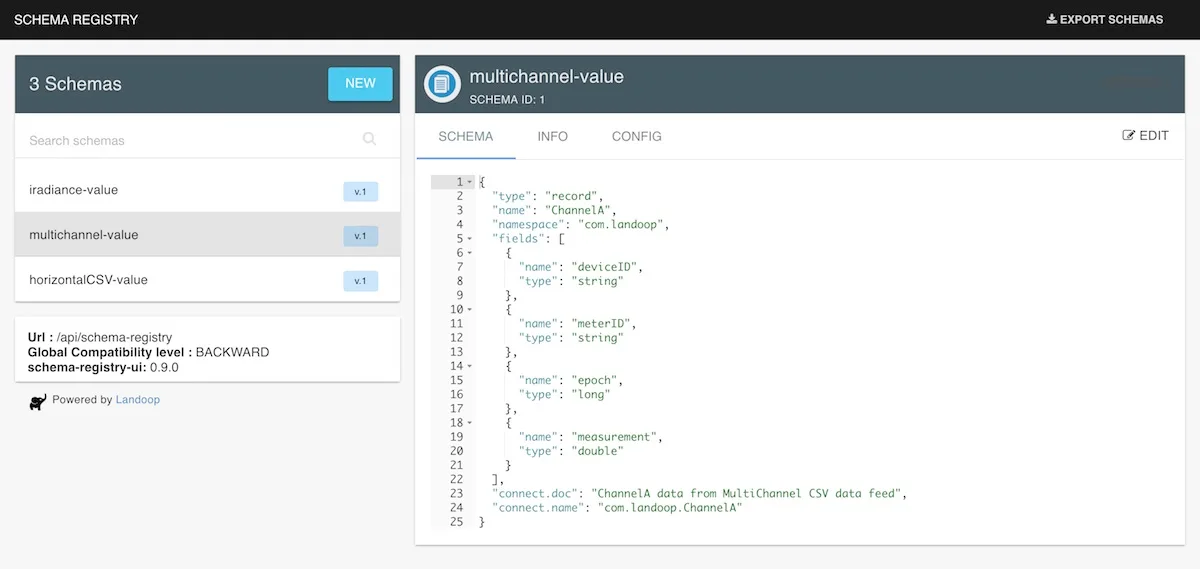
We can inspect our schemas:
And using the kafka-topics-ui we can also see the data landing into the topic:
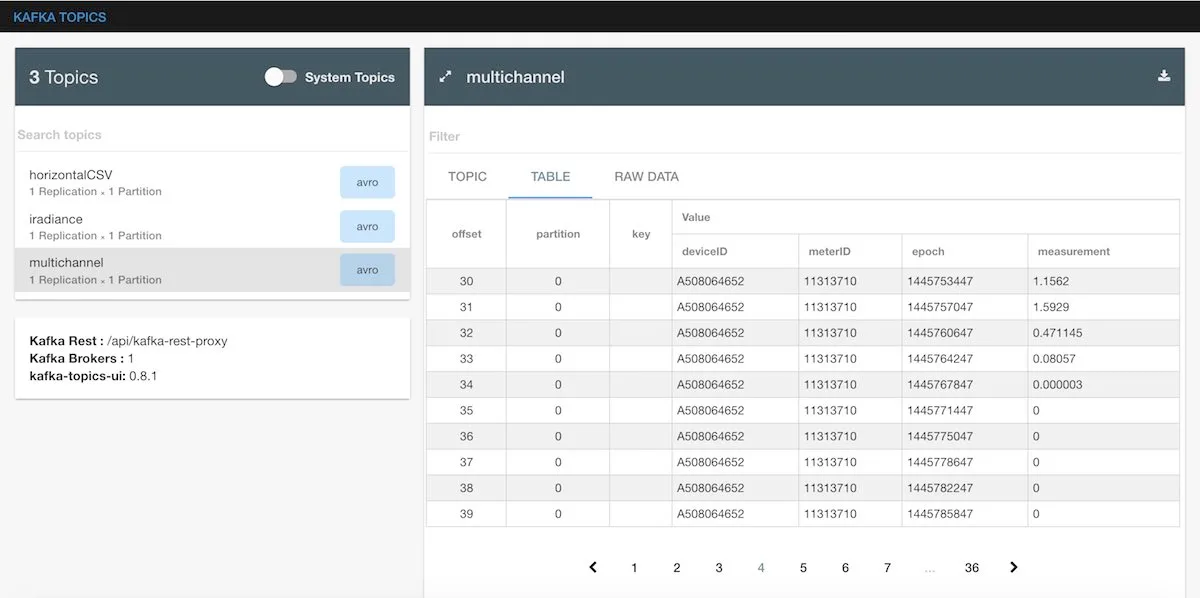
You will have noticed, that currently all topics have 1 partition and 1 replication factor.
Binary compressed files
Setting up a connector to fetch binary files, is supported by default, by using the
In the above configuration we have selected the ftp.monitor.update
capability of the connector.
No development is required, and all we need to do is post a connector with the appropriate configuration.
```
cat << EOF > binary-ftp-source-connector.json
{
  "name": "binary-ftp",
  "config": {
    "tasks.max": "1",
    "connector.class": "com.datamountaineer.streamreactor.connect.ftp.source.FtpSourceConnector",
    "connect.ftp.address": "192.168.0.15:21",
    "connect.ftp.user": "Antwnis",
    "connect.ftp.password": "********",
    "connect.ftp.refresh": "PT1M",
    "connect.ftp.file.maxage": "P14D",
    "connect.ftp.keystyle": "struct",
    "connect.ftp.monitor.update": "backup/*:backup-files"
  }
}
EOF

 curl -X POST -H "Content-Type: application/json" -H "Accept: application/json" -d @binary-ftp-source-connector.json \
   http://192.168.99.100:8083/connectors
```
Connect Topology
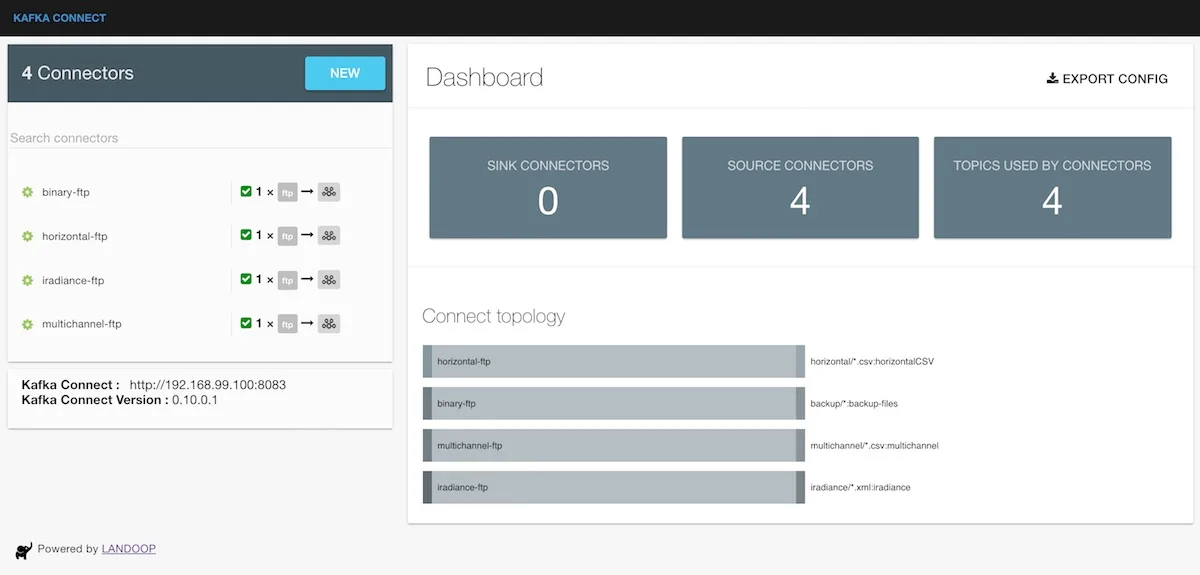
We can now have a unified view of our Connect topology using the kafka-connect-ui tool:
Conclusions
In this article we have presented how to use Kafka Connect to set up connectors to poll remote FTP locations, pick up
new data (in a variety of file-formats) and transform it into Avro messages and transmit these Avro messages to Apache Kafka.
In the second part of this Blog we will present how to run a setup such as the above operationally with associated
metrics, monitoring and alerting.
Happy coding - Landoop team.