The 3 AM Incident
Picture this: It's 3 AM. You’re on-duty in case there is an outage. A team in the other part of the world merged PR and released a new version of K2K Replicator and it crashed.
Consumer group lag is spiking to the universe. You’re paged & woken up, went to your laptop, the team already reverted PR, things are stabilising, but what really happened, you have to investigate now as postmortem has to be done.
On the first glance everything looks normal, the team introduced new property max.poll.record, nothing wrong in that, that shouldn’t crash the deployment. Until, your brain finally awakes after half an hour and figures out, it shouldn’t be max.poll.record but max.poll.records. Well, that’s half an hour of sleep and one postmortem down the drain!
Sound familiar?
Configuration errors are the silent killers of distributed systems. They slip through code reviews, bypass unit tests, and wait patiently in production to ruin your day. But there's a hero in this story: JSON Schema.
What is JSON Schema?
JSON Schema is like a bouncer at an exclusive club. It checks your configuration at the door and rejects anything that doesn't belong. Think of it as a contract that defines:
- What properties are required (eg. did you forget the bootstrap servers?)
- What values are valid (acks can be 0, 1, or "all", not "banana")
- What types are expected (integers vs strings)
- What properties even exist (No, max.poll.record is not a thing)
In essence, JSON Schema validates your configuration before it reaches your application, catching errors at design time instead of runtime.
If you are interested in more, you can read it in the start of our small series about Applications configuration with JSON Schemas.
The Kafka2Kafka Configuration Challenge
We want to provide our users an as fluid as possible experience. One way is through a JSON Schema which offers auto completion / suggestion and validation checks when creating K2K pipelines in your favourite IDE.
In the latest blog I talked about how to migrate AWS MSK to Express Brokers with Lenses K2K Replicator. In order to expand the story, we will re-use some of the examples from there.
Let's look at a real-world example: configuring a Kafka2Kafka (K2K) replication pipeline.
Here's a snippet from our k2k.yaml:
name: "pipeline-k2k-demo"
license:
  acceptEula: true
  token: "----"
features:
  autoCreateTopics: enabled
  autoCreateControlTopics: enabled
source:
  kafka:
    common:
      bootstrap.servers: "boot-sg0feocb.c3.kafka-serverless.eu-west-1.amazonaws.com:9098"
      sasl.mechanism: "AWS_MSK_IAM"
      security.protocol: "SASL_SSL"
      sasl.jaas.config=software.amazon.msk.auth.iam.IAMLoginModule required;
      sasl.client.callback.handler.class=software.amazon.msk.auth.iam.IAMClientCallbackHandler
    consumer:
      group.id: k2k.eot
      max.poll.records: 50000
target:
  kafka:
    common:
      "bootstrap.servers": "kafka:9098"
    producer:
      buffer.memory: 124288000
      batch.size: 500000
      linger.ms: 0
      "acks": "1"
This configuration has over 30 configurable properties across multiple sections. Each section (source/target, consumer/producer) accepts different Kafka configuration properties. The producer alone has 88+ valid configuration options.
How do you ensure you're not mixing consumer properties in the producer section? Or accidentally using a property that doesn't exist?
Enter JSON Schema.
Building Our Schema Shield
Our json-schemas act as a comprehensive validation layer. Download it from our Git repo.
Now, let's see how it protects us from common mistakes.
Example 1: Catching Typos
Bad Configuration:
source:
  kafka:
    consumer:
      "group.id": "k2k.eot"
      "max.poll.record": "50000"  # Missing 's' at the end!
Schema Validation Result:
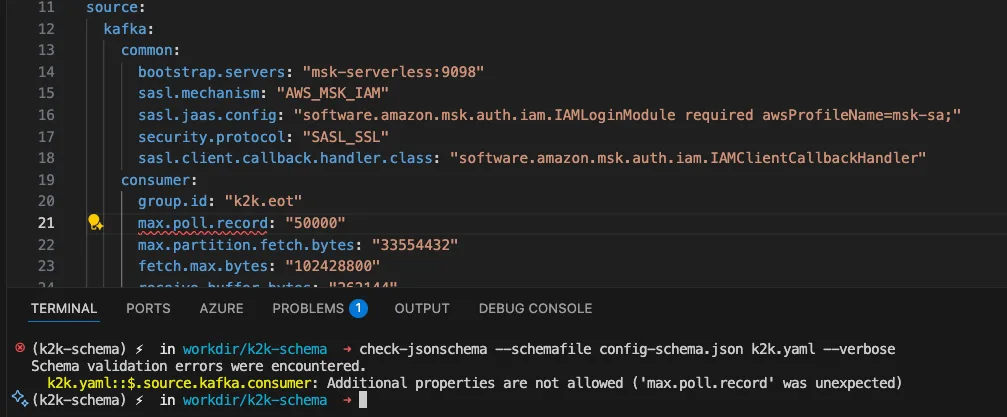
The schema knows every valid consumer property. It has exactly 98 consumer configuration properties defined, and max.poll.record isn't one of them. The correct property is max.poll.records.
Example 2: Wrong Property in Wrong Place
Bad Configuration:
target:
  kafka:
    producer:
      "buffer.memory": "124288000"
      "group.id": "my-group"  # This is a CONSUMER property!
Schema Validation Result:
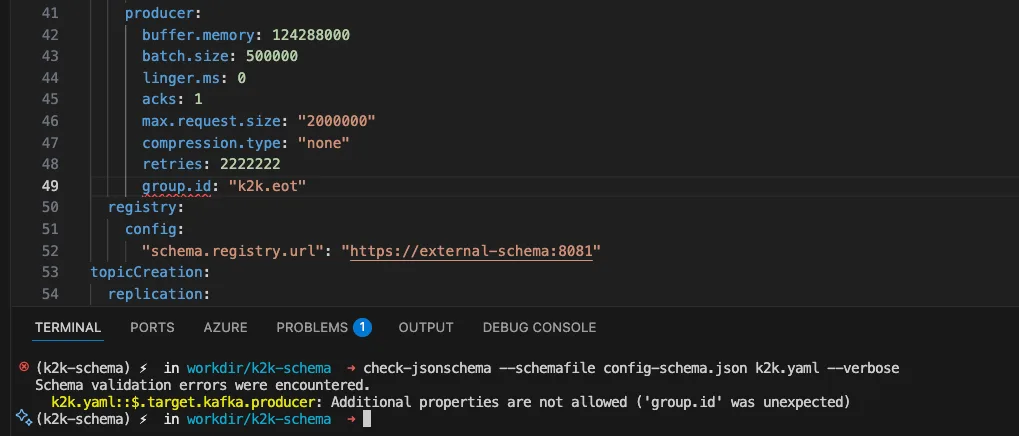
Our schema has "additionalProperties" set to false for both consumer and producer sections. This means no properties can be set beyond:
- Producer section: The 88 specific allowed producer properties
- Consumer section: The 98 specific allowed consumer properties
No mixing. No confusion.
Example 3: Invalid Enum Values
Bad Configuration:
source:
  kafka:
    consumer:
      "auto.offset.reset": "beginning"  # Wrong value!
Schema Validation Result:
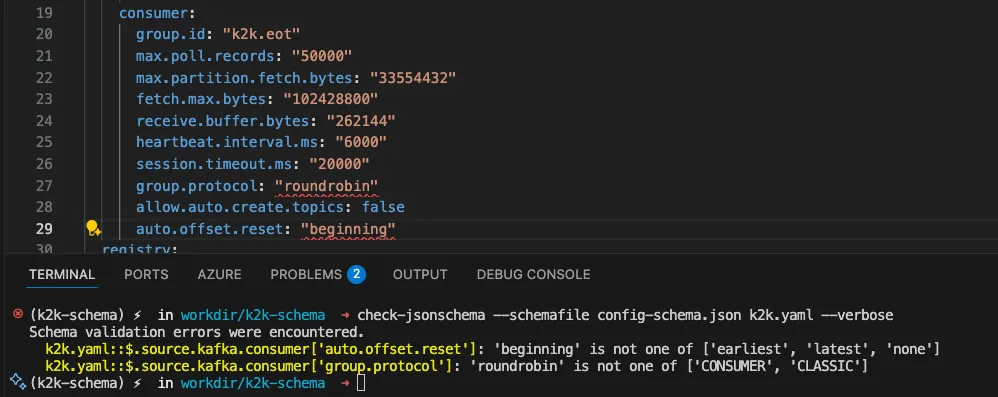
The schema knows that auto.offset.reset only accepts three specific values: "beginning" sounds right, but it's not in the Kafka spec, the correct value is "earliest".
Example 4: Missing Required Fields
Bad Configuration:
name: "my-pipeline"
source:
  kafka:
    common:
      "bootstrap.servers": "localhost:9092"
    # Missing required 'consumer' section!
Schema Validation Result:
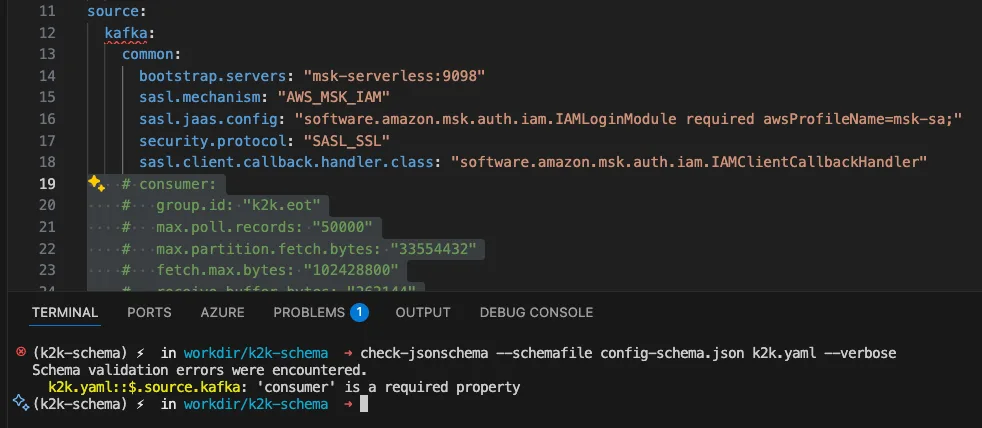
The schema enforces that certain properties are mandatory:
- name (pipeline name)
- source.kafka.common.bootstrap.servers
- source.kafka.consumer.group.id
- target.kafka.common.bootstrap.servers
- replication array with source and sink definitions.
Example 5: Type Mismatches
Bad Configuration:
target:
  kafka:
    producer:
      "batch.size": "five hundred thousand"  # Should be a number!
Schema Validation Result:
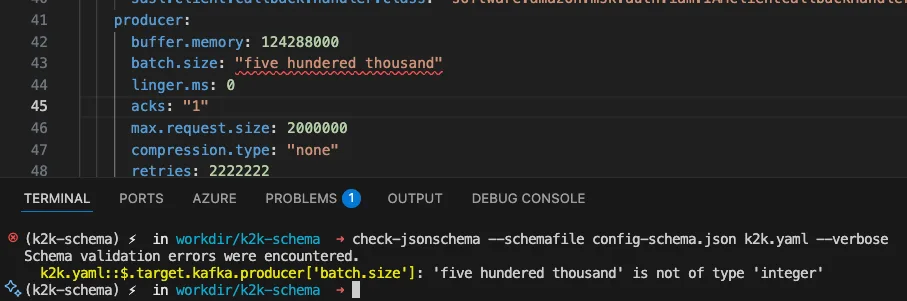
Most Kafka properties accept either string or integer representations ("500000" or 500000), but they must be valid numeric values.
Example 6: Perfect Configuration
Good Configuration:
name: "pipeline-k2k-demo"
license:
 acceptEula: true
 token: "test"
features:
 autoCreateTopics: enabled
 autoCreateControlTopics: enabled
 exactlyOnce: disabled
 tracingHeaders:
   partition: disabled
source:
 kafka:
   common:
     bootstrap.servers: "msk-serverless:9098"
     sasl.mechanism: "AWS_MSK_IAM"
     sasl.jaas.config: "software.amazon.msk.auth.iam.IAMLoginModule required awsProfileName=msk-sa;"
     security.protocol: "SASL_SSL"
     sasl.client.callback.handler.class: "software.amazon.msk.auth.iam.IAMClientCallbackHandler"
   consumer:
     group.id: "k2k.eot"
     max.poll.records: 50000
     max.partition.fetch.bytes: 33554432
     fetch.max.bytes: 102428800
     receive.buffer.bytes: 262144
     heartbeat.interval.ms: 6000
     session.timeout.ms: 20000
 registry:
   config:
     schema.registry.url: "http://external-schema:8081"
target:
 kafka:
   common:
     bootstrap.servers: "aws-expressbrokers:9098"
     sasl.mechanism: "AWS_MSK_IAM"
     sasl.jaas.config: "software.amazon.msk.auth.iam.IAMLoginModule required awsProfileName=msk-sa;"
     security.protocol: "SASL_SSL"
     sasl.client.callback.handler.class: "software.amazon.msk.auth.iam.IAMClientCallbackHandler"
   producer:
     buffer.memory: 124288000
     batch.size: 5000
     linger.ms: 0
     acks: "1"
     max.request.size: 2000000
     compression.type: "none"
     retries: 2222222
 registry:
   config:
     "schema.registry.url": "https://external-schema:8081"
topicCreation:
 replication:
   common:
     replication: 3
     config:
       "max.message.bytes": "20000000"
 control:
   common:
     replication: 3
replication:
 - source:
     name: source
     topic:
       - "props"
 - sink:
     name: "target"
     topic:
       prefix: "k2k.eot."
     partition: source
Schema Validation Result:
✅ SUCCESS: Configuration is valid!
Every property is spelled correctly, in the right section, with valid values. No typos. No misplacements. No surprises at 3 AM.
The Power of Strict Validation
Here's what makes our schema powerful:
1. Comprehensive Property Whitelisting
We've explicitly defined every valid property for:
- 88 producer properties: From acks to transactional.id
- 98 consumer properties: From group.id to max.poll.records
- All SSL/TLS properties for secure connections
- All SASL properties for authentication (Kerberos, OAuth, AWS IAM)
- All metadata, metrics, and recovery properties
2. Zero Tolerance for Extras
With "additionalProperties": false, the schema rejects:
- Typos (eg. max.poll.record )
- Made-up properties (eg. super.fast.mode)
- Properties in wrong sections (eg. consumer property in producer section)
3. Smart Type Validation
"batch.size": {
  "type": ["integer"],
  "description": "Producer will attempt to batch records together"
}
This accepts both "500000" (string) and 500000 (integer), matching Kafka's flexible configuration style.
4. Enum Constraints
"compression.type": {
  "type": "string",
  "enum": ["none", "gzip", "snappy", "lz4", "zstd"]
}
Only valid compression types are accepted. No guessing. No "what compression types does Kafka support again?"
Real-World Impact
Before JSON Schema validation, our team experienced:
- 2-3 hours average debugging time for configuration errors
- Configuration bugs making it to production monthly
- Stress and anxiety during deployments
After implementing strict JSON Schema validation:
- Configuration errors caught at commit time
- Zero production incidents from typos or invalid configs
- Faster onboarding for new team members (schema serves as documentation)
- IDE autocomplete when using schema-aware editors
How to Use JSON Schema in Your Project
1. Define Your Schema
Create a config-schema.json that describes your configuration structure:
{
  "$schema": "http://json-schema.org/draft-07/schema#",
  "type": "object",
  "required": ["name", "source", "target"],
  "properties": {
    "name": {
      "type": "string",
      "minLength": 1
    }
  },
  "additionalProperties": false
}
Enable IDE Support

Add a reference in your YAML/JSON files. For VSCode:
1.- Create .vscode folder within your workspace alongside file .vscode/setting.json
2.- Inside settings.json place
{
"yaml.schemas": {
 "./config-schema.json": ["*.yaml", "*.yml"]
  }
}
3.-Enjoy VSCode autocomplete!
Conclusion
Configuration errors are preventable. With JSON Schema, you create a safety net that catches typos, validates values, and enforces structure before your application ever runs.
Our Kafka2Kafka pipeline went from "hope and pray" configuration to bulletproof validation with:
- 186 explicitly defined properties (88 producer + 98 consumer)
- Zero tolerance for invalid properties
- Type-safe value validation
- Required field enforcement
The next time you're tempted to write a configuration file without a schema, remember: it's 3 AM somewhere, and a typo is waiting to wake you up.
Don't let fat fingers ruin your day. Let JSON Schema be your protector.
How to use your new shiny JSON schema in your CI/CD pipeline? Stay tuned, it’s coming soon!