
This article presents how Avro lib writes to files and how we can achieve significant performance improvements by parallelizing the write.
A (JVM) library has been implemented and is available on Github fast-avro-write
The reason we proceeded with this implementation was a project that required writing multiple Μillions of Avro messages
from Kafka onto a star DW (data warehouse) in HIVE (HDFS). You might have heard about (or even dealt with) the
challenges of working with HDFS. You can read more about it in this article available
here
The bigger challenge was building an efficient Kafka Connect HDFS / Hive Sink to cater for the specific requirements
of landing large volumes of data to HDFS in batches and being able to track completeness while each batch can spread
over multiple tables and it can be sliced into multiple chunks which are processed simultaneously.
Performance bottleneck
What we originally noticed was a performance bottleneck
table location. We tend to get ~1M records from Kafka at once and write them to an Avro file(-s) according to the table
partitioning. With the existing Avro library (apache org.apache.Avro
write speed.
Spending ~16 seconds writing 1M records means we are not consuming data in real time and the ingestion process is delayed.
After spending some time tweaking the HDFS FileSystem configuration for buffer size and socket buffers hoping to improve
performance, we shifted our attention to the Apache Avro library to understand how it works. To make things clear,
we were targeting at optimizing writes for Hive tables with 100+ or even 300+ columns (those are the kind of records
sent over Kafka); for smaller schemas the improvements are not as significant.
Existing writing model
Let’s look how we would write an Avro file with the Apache library:
```
import org.apache.avro.generic.GenericDatumWriter

val out = new BufferedOutputStream(new FileOutputStream(file), 4 * 1048576)val datumWriter = new GenericDatumWriter[GenericRecord](schema)val writer = new DataFileWriter(datumWriter)
  .setCodec(org.apache.avro.file.CodecFactory.snappyCodec())
  .create(schema, out)
writer.setFlushOnEveryBlock(false)
records.foreach(writer.append)
```
In the above example, we create the writer and as we iterate through each Avro record we write it to the file.
Before moving on to the fast-avro-write library let’s have a high-level view of how the Avro DataFileWriter works.
The diagram below describes the bytes flow; we have two level of buffers (via de BinaryEncoders - the actual instance
will end up being a BufferedBinaryEncoder) and an OutputStream which in most cases it’s likely to be buffered as well.
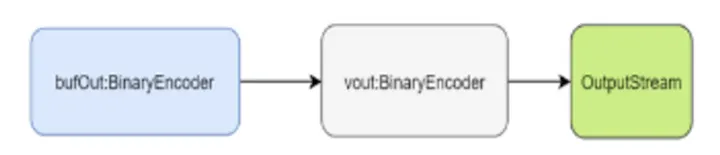
The bufOut
the buffer fills up, the raw bytes are passed to the vout
layer and writes it to the vout
```
private void writeBlock() throws IOException {
  if (blockCount > 0) {
    bufOut.flush();
    ByteBuffer uncompressed = buffer.getByteArrayAsByteBuffer();
    DataBlock block = new DataBlock(uncompressed, blockCount);
    block.setFlushOnWrite(flushOnEveryBlock);
    block.compressUsing(codec);
    block.writeBlockTo(vout, sync);
    buffer.reset();
    blockCount = 0;
  }}
```
While the vout
(below is the code we are using from our library but it does nothing more than the apache.avro lib) before writing the
Avro data blocks.
```
private val vout: BinaryEncoder = encoderFactory.binaryEncoder(out, null)
vout.writeFixed(DataFileConstants.MAGIC) // write magic
vout.writeMapStart() // write metadata
vout.setItemCount(meta.size)
meta.foreach { case (key, value) =>
  vout.startItem()
  vout.writeString(key)
  vout.writeBytes(value)}
vout.writeMapEnd()
vout.writeFixed(syncMarker) // write initial sync
vout.flush() //vout may be buffered, flush before writing to out
```
We will not go into the detail of the data block writing (a quick check on DataFileStream#DataBlock in org.apache.avro library will give you the details of what happens).
The vout
Improved writing model
To get better performance we had to parallelize the write; we expect the input to be a collection of records to write at
once rather than one record at a time. Given the parallelization factor we will split the incoming collection into
chunks and process each one individually and in parallel. Each chunk gets a first layer buffer allocated and as it
fills up, the content will be sent to the second buffer.
Logically this looks like this:
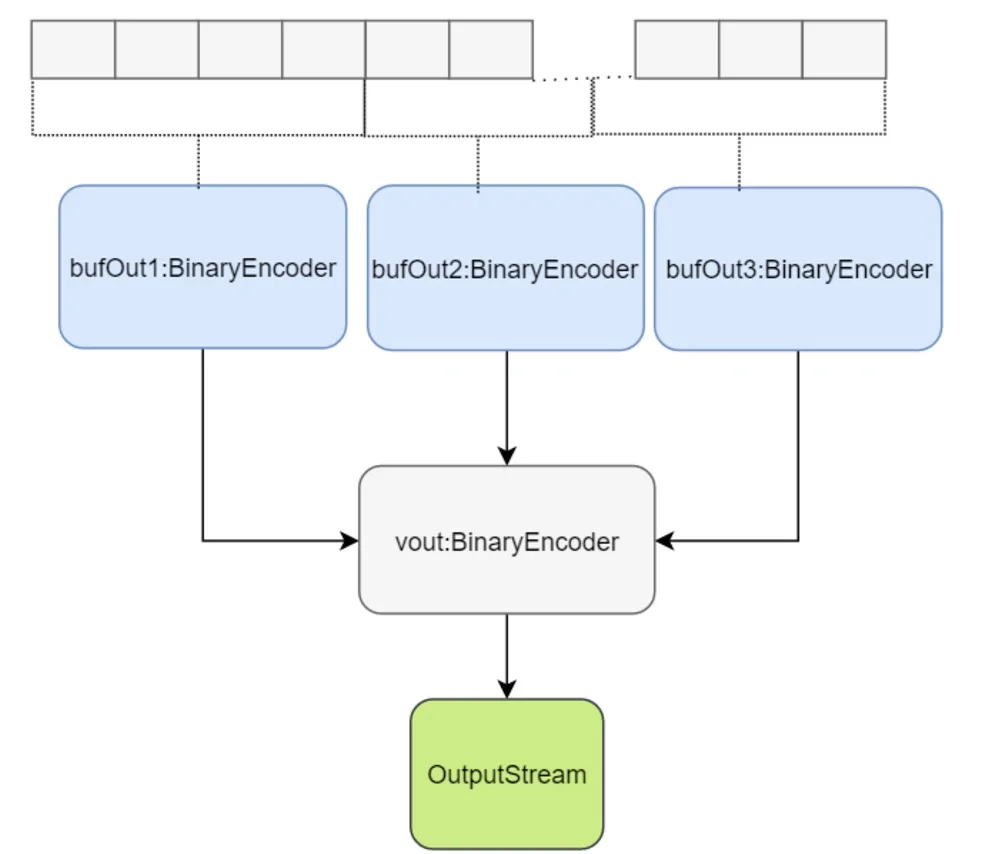
Since we write concurrently to the first layer of buffers we have to serialize the write to the second buffer layer. As a
result “the order of the records in the file might not be matching the order provided in the incoming collection”.
So here is how you would write using the new library.
```
val out = new BufferedOutputStream(new FileOutputStream(file), 4 * 1048576)

import org.apache.avro.generic.GenericDatumWriterval datumWriter = new GenericDatumWriter[GenericRecord](schema)val builder = FastDataFileWriterBuilder(datumWriter, out, schema)
  .withCodec(CodecFactory.snappyCodec())
  .withFlushOnEveryBlock(false)
  .withParallelization(parallelization)

builder.encoderFactory.configureBufferSize(4 * 1048576)
builder.encoderFactory.configureBlockSize(4 * 1048576)

val fileWriter = builder.build()
fileWriter.write(records)
fileWriter.close()
```
Stats and settings
The tests have been run on 8GB, i7-4650U with SSD
We are using the following class to generate Avro GenericRecord instances:
```
case class StockQuote(symbol: String,
                      timestamp: Long,
                      ask: Double,
                      askSize: Int,
                      bid: Double,
                      bidSize: Int,
                      dayHigh: Double,
                      dayLow: Double,
                      lastTradeSize: Int,
                      lastTradeTime: Long,
                      open: Double,
                      previousClose: Double,
                      price: Double,
                      priceAvg50: Double,
                      priceAvg200: Double,
                      volume: Long,
                      yearHigh: Double,
                      yearLow: Double,
                      f1:String="value",
                      f2:String="value",
                      f3:String="value",
                      // ...
                      f59:String="value",
                      f60:String="value"
                     )
```
We are doing 10 runs for each mode and take the low/high time measured. These are the figures obtained (all values are
in milliseconds)

So with paralellization in the serialization you can achieve 200% the performance of the default Avro library.
The API allows you to specify a threshold for which parallelization is avoided and it falls back to a single threaded
write. The default value is 50k but it can be overwritten by the user.
Parallelization level shouldn’t exceed the number of available CPUs.
Furthermore you can see from the stats table above the impact over performance when using higher level of
parallelization.
To get the best performance there needs to be a bit of testing done to see what’s the optimum setting given your
incoming schema for the average collection size it would process at one time.
Source code
Find the source code GitHub